<?xml version="1.0" encoding="utf-8"?><feed xmlns="http://www.w3.org/2005/Atom" ><generator uri="https://jekyllrb.com/" version="3.10.0">Jekyll</generator><link href="https://www.djackson.org/feed.xml" rel="self" type="application/atom+xml" /><link href="https://www.djackson.org/" rel="alternate" type="text/html" /><updated>2026-07-27T20:44:30-07:00</updated><id>https://www.djackson.org/feed.xml</id><title type="html">djackson.org</title><subtitle>Personal blog: interests include technology, programming, iOS, woodworking, and others.</subtitle><author><name>Dan Jackson</name></author><entry><title type="html">Internal search &amp;amp; Go Links</title><link href="https://www.djackson.org/internal-search-&-go-links/" rel="alternate" type="text/html" title="Internal search &amp;amp; Go Links" /><published>2025-01-01T18:25:00-08:00</published><updated>2025-01-01T18:25:00-08:00</updated><id>https://www.djackson.org/internal-search-&amp;-go-links</id><content type="html" xml:base="https://www.djackson.org/internal-search-&amp;-go-links/"><![CDATA[<p>When I started working at Stripe, I was on a team of new hires who did some work to re-vamp the internal search. These projects are small, well-scoped, and designed to be a quick introduction to development processes at the company, even if they have nothing to do with your day-to-day work. Which was certainly true for me, because it had little to do with the mobile development role I’d been hired for. However, I did find a feature to add that I remain proud of.</p>

<h2 id="go-links-in-search">Go Links in Search</h2>

<p>Internal search ran on an Elasticsearch cluster, and it had a variety of data sources it would index: documents, wiki, people directory, etc. However, there was a parallel system used for content sharing: “go links”. Throughout onboarding, we were constantly being given shortened URLs (ex: <code class="language-plaintext highlighter-rouge">go/some-words</code>), which led to the canonical location for whatever the <code class="language-plaintext highlighter-rouge">some-words</code> were. At least according to whoever had associated them together.</p>

<p>I realized this was probably the gold standard for search term relevance, and set up indexing of the go-link database. It made for very plain search results: the word(s), the url, and a little bit of metadata, but I think it made a big difference: it made the go links discoverable (within the limits of Elasticsearch’s word relevance settings), and it augmented search results with hits that a human said “this link is the best place to go for this word or phrase”.</p>

<p>I really liked the project, and found it rewarding working on internal tooling that people were using every day.</p>

<h2 id="video-conferencing-links">Video conferencing links</h2>

<p>My last shipped feature was another internal feature, and it was directly driven from the upcoming COVID pandemic. I’d given my two-week notice, and was about to start <a href="/funemployment/">funemployment</a>. During my last two weeks of work, they announced an office shutdown. I’d done (what I think was) enough to hand off my “real” work, and was trying to find small pieces of work where I could continue to add value.</p>

<p>This was almost 5 years ago, and I haven’t thought about it much since then, but to the best of my recollection:</p>

<p>Stripe was using BlueJeans as their video conferencing (the specific service isn’t important). It had a feature to set up a short URL that’d lead directly to your personal video conference. At Stripe, employees were almost universally known by their username. However, the service was more restrictive than our usernames, meaning some employees needed a different solution. There were some people setting up ad-hoc Go Links to work around the limitations. This was actively happening in my last week as the entire company switched to fully remote work.</p>

<p>I honestly don’t remember the specifics, but drawing on the experience I had from the previously discussed project, I quickly added a feature that let people link their Stripe username with their video conferencing identifier. It worked out of the box for most employees, and the ones who needed to customize it were able to.</p>

<p>I <em>think</em> it was part of your customizable employee profile (where you could edit your name, pronouns, interests, location, etc), and I think it was used as <code class="language-plaintext highlighter-rouge">go/bj/&lt;username&gt;</code>. If that <code class="language-plaintext highlighter-rouge">username</code> had a customization, it’d use it, otherwise it’d just use the <code class="language-plaintext highlighter-rouge">username</code> directly. I <em>also think</em> I put that link on the search result display for a Person, but I wouldn’t swear to it in court.</p>

<p>I got it reviewed, deployed, and had time to write a Shipped email announcing it. If I remember correctly, that email went out late afternoon on my last day. I don’t actually know how well it was received, but I had high hopes it’d be useful.</p>

<p>I also thought there was something poetic about starting &amp; ending my tenure with internal tooling improvements.</p>]]></content><author><name>Dan Jackson</name></author><category term="development" /><category term="projects" /><summary type="html"><![CDATA[When I started working at Stripe, I was on a team of new hires who did some work to re-vamp the internal search. These projects are small, well-scoped, and designed to be a quick introduction to development processes at the company, even if they have nothing to do with your day-to-day work. Which was certainly true for me, because it had little to do with the mobile development role I’d been hired for. However, I did find a feature to add that I remain proud of.]]></summary></entry><entry><title type="html">_port_caching_policy:12: bad math expression: operator expected</title><link href="https://www.djackson.org/port-caching-policy-12-bad-math-expression-operator-expected/" rel="alternate" type="text/html" title="_port_caching_policy:12: bad math expression: operator expected" /><published>2023-07-17T00:00:00-07:00</published><updated>2023-07-17T00:00:00-07:00</updated><id>https://www.djackson.org/port-caching-policy-12-bad-math-expression-operator-expected</id><content type="html" xml:base="https://www.djackson.org/port-caching-policy-12-bad-math-expression-operator-expected/"><![CDATA[<p>Today, I was doing a <a href="https://www.macports.org">MacPorts</a> self update, and wanted to see what was outdated. However, I got an interesting error when hitting tab to show auto-completion options:</p>

<div class="language-console highlighter-rouge"><div class="highlight"><pre class="highlight"><code><span class="gp">&gt;</span><span class="w"> </span>port list &lt;tab&gt;
<span class="go">    _port_caching_policy:12: bad math expression: operator expected at `16777234\ni...'
</span></code></pre></div></div>

<p>Today, there’s a single hit on google for “_port_caching_policy”, and it’s <a href="https://github.com/zsh-users/zsh-completions/blob/master/src/_port">the function on
github</a>. Which, fair. It’s not especially interesting, just a very basic comparison between file modification times to see if the cache should be updated or not.</p>

<div class="language-zsh highlighter-rouge"><div class="highlight"><pre class="highlight"><code><span class="nb">stat</span> <span class="nt">-f</span>%m <span class="nb">.</span> <span class="o">&gt;</span> /dev/null 2&gt;&amp;1
<span class="k">if</span> <span class="o">[</span> <span class="s2">"</span><span class="nv">$?</span><span class="s2">"</span> <span class="o">=</span> 0 <span class="o">]</span><span class="p">;</span> <span class="k">then
  </span><span class="nv">stat_cmd</span><span class="o">=(</span><span class="nb">stat</span> <span class="nt">-f</span>%Z<span class="o">)</span>
<span class="k">else
  </span><span class="nv">stat_cmd</span><span class="o">=(</span><span class="nb">stat</span> <span class="nt">--format</span><span class="o">=</span>%Z<span class="o">)</span>
<span class="k">fi

</span>_port_caching_policy<span class="o">()</span> <span class="o">{</span>
  <span class="nb">local </span>reg_time comp_time check_file
  <span class="k">case</span> <span class="s2">"</span><span class="k">${</span><span class="nv">1</span><span class="p">##*/</span><span class="k">}</span><span class="s2">"</span> <span class="k">in
    </span>PORT_INSTALLED_PACKAGES<span class="p">)</span>
      <span class="nv">check_file</span><span class="o">=</span><span class="nv">$port_prefix</span>/var/macports/registry/registry.db
      <span class="p">;;</span>
    PORT_AVAILABLE_PACKAGES<span class="p">)</span>
      <span class="nv">check_file</span><span class="o">=</span><span class="k">${</span><span class="si">$(</span>port <span class="nb">dir </span>MacPorts<span class="si">)</span><span class="p">%/*/*</span><span class="k">}</span>/PortIndex
      <span class="p">;;</span>
  <span class="k">esac</span>
  <span class="nv">reg_time</span><span class="o">=</span><span class="si">$(</span><span class="nv">$stat_cmd</span> <span class="nv">$check_file</span><span class="si">)</span>
  <span class="nv">comp_time</span><span class="o">=</span><span class="si">$(</span><span class="nv">$stat_cmd</span> <span class="nv">$1</span><span class="si">)</span>
  <span class="k">return</span> <span class="k">$((</span> reg_time &lt; comp_time <span class="k">))</span>
<span class="o">}</span>
</code></pre></div></div>

<h1 id="️-zsh-completions">⌨️ ZSH completions</h1>

<p>I was pretty impressed to find <a href="https://github.com/zsh-users/zsh-completions/blob/master/zsh-completions-howto.org#testing--debugging">docs on debugging completions</a>, and at various points used all three shortcuts( <code class="language-plaintext highlighter-rouge">alt-2 ctrl-x h</code>, <code class="language-plaintext highlighter-rouge">ctrl-x h</code>, and <code class="language-plaintext highlighter-rouge">ctrl-x ?</code>).</p>

<p>It was quickly evident that <code class="language-plaintext highlighter-rouge">stat</code> was returning the full details, but the code was expecting a single number from each execution:</p>

<div class="language-plaintext highlighter-rouge"><div class="highlight"><pre class="highlight"><code>stat '--format=%Z' /opt/local/var/macports/sources/rsync.macports.org/release/tarballs/ports/PortIndex
reg_time=$'device  16777234\ninode   19150376\nmode    33188\nnlink   1\nuid     0\ngid     0\nrdev    0\nsize    21393774\natime   1689623078\nmtime   1689614240\nctime   1689623082\nblksize 4096\nblocks  41792\nlink    '

stat '--format=%Z' /Users/daniel/.cache/zsh4humans/v4/cache/zcompcache-5.9/PORT_AVAILABLE_PACKAGES
comp_time=$'device  16777234\ninode   16062342\nmode    33188\nnlink   1\nuid     501\ngid     20\nrdev    0\nsize    590845\natime   1689287896\nmtime   1689273088\nctime   1689273088\nblksize 4096\nblocks  1160\nlink    '

_port_caching_policy:12: bad math expression: operator expected at `16777234\ni...'
</code></pre></div></div>

<h1 id="-stat-vs-stat-vs-zshstat">📝 stat vs stat vs zsh/stat</h1>

<p>Ok, so the behavior of <code class="language-plaintext highlighter-rouge">stat</code> has changed. Maybe old code that needs to be updated for Ventura? Except that the code already handles the BSD-flavored <a href="https://ss64.com/osx/stat.html">stat</a>, as well as the <a href="https://man7.org/linux/man-pages/man1/stat.1.html">coreutils version</a>.</p>

<p>And the <code class="language-plaintext highlighter-rouge">stat</code> command in my terminal doesn’t behave like either of those, because … it’s the <a href="https://zsh.sourceforge.io/Doc/Release/Zsh-Modules.html#The-zsh_002fstat-Module">zsh/stat</a> builtin module, with output like this:</p>

<div class="language-plaintext highlighter-rouge"><div class="highlight"><pre class="highlight"><code>device  16777234
inode   1129680
mode    16877
nlink   7
uid     501
gid     20
rdev    0
size    224
atime   1689639115
mtime   1689639115
ctime   1689639115
blksize 4096
blocks  0
link
</code></pre></div></div>

<p>Prominent in the documentation:</p>

<blockquote>
  <p>The same command is provided with two names; as the name stat is often used by an external command it is recommended that only the zstat form of the command is used. This can be arranged by loading the module with the command ‘zmodload -F zsh/stat b:zstat’.</p>
</blockquote>

<h1 id="️-zstat-mtime">🕰️ <code class="language-plaintext highlighter-rouge">zstat +mtime</code></h1>

<p>I was partway through a PR to add a <em>third</em> case, preferring to use <code class="language-plaintext highlighter-rouge">zstat</code> if it’s loaded. It makes sense to me that using the shell builtin <em>would</em> be preferable, but I don’t know how common it is to have it loaded. So I don’t think it can completely replace the if / else that determines <code class="language-plaintext highlighter-rouge">stat_cmd</code>. And any theoretical performance win from an in-process syscall (vs executing the separate binary) is going to be invisible against cost of reading the (currently) 580 KB cache file.</p>

<div class="language-zsh highlighter-rouge"><div class="highlight"><pre class="highlight"><code><span class="k">if</span> <span class="o">((</span> <span class="nv">$+</span>builtins[zstat] <span class="o">))</span><span class="p">;</span> <span class="k">then
  </span><span class="nv">stat_cmd</span><span class="o">=(</span>zstat +mtime<span class="o">)</span>
<span class="k">else</span>
  <span class="c"># existing bsd vs coreutils switch</span>
<span class="k">fi</span>
</code></pre></div></div>

<p>I’d written and tested a change, and was working on the rationale for the commit message.</p>

<h1 id="-who-loaded-zshstat-so-that-it-shadows-stat">🔎 Who loaded <code class="language-plaintext highlighter-rouge">zsh/stat</code> so that it shadows <code class="language-plaintext highlighter-rouge">stat</code>?</h1>

<p>I was fairly late to switch to zsh, and when I finally did, <a href="https://github.com/romkatv/zsh4humans/tree/v4">zsh4humans v4</a> had a compelling sales pitch:</p>

<blockquote>
  <p>A turnkey configuration for Z shell that aims to work really well out of the box. It combines the best Zsh plugins into a coherent whole that feels like a finished product rather than a DIY starter kit.
If you want a great shell that just works, this project is for you.</p>
</blockquote>

<p>I wasn’t interested in the SSH-based features, and turned them off. I made some basic changes to the config, and it’s been working great for me. So much so, that I never switched to the v5 branch, and was disappointed to read the author has moved onto other things. I certainly understand though, since it looked like many “Issues” raised ended up with him effectively volunteering his time to help folks debug their shell configurations.</p>

<p>So when I tracked down the <code class="language-plaintext highlighter-rouge">zmodload zsh/stat</code> in <a href="https://github.com/romkatv/zsh4humans/blob/caf55d974e4cbae2ccb1e09ba832664426bef524/main.zsh#L39">main.sh</a> and then found it was <a href="https://github.com/romkatv/zsh4humans/issues/173">fixed in v5</a> almost two years ago, it felt like this whole journey was self-imposed.</p>

<p>There were many spots where <code class="language-plaintext highlighter-rouge">zsh/stat</code> <em>was</em> loaded as recommended, so that it only adds the <code class="language-plaintext highlighter-rouge">zstat</code> builtin. If <code class="language-plaintext highlighter-rouge">zsh</code> has a debugging feature for showing where a module is loaded, I never found it. Instead it was looking through the various config files, and using a multi-file grep, which was hindered by the fact this specific <code class="language-plaintext highlighter-rouge">zmodload</code> command used globbing features to load several modules at once, and it wasn’t a direct textual match for <code class="language-plaintext highlighter-rouge">zsh/stat</code>.</p>

<p>Anyway, if your code is calling <code class="language-plaintext highlighter-rouge">stat</code> with <code class="language-plaintext highlighter-rouge">-f</code> or <code class="language-plaintext highlighter-rouge">--format</code>, and you’re unexpectedly getting all the fields, you might be inadvertently using <code class="language-plaintext highlighter-rouge">zstat</code>.</p>

<p>I guess it’s <em>possible</em> that someone, someday, will also have <code class="language-plaintext highlighter-rouge">zsh/stat</code> fully loaded, and the completion script will break on the same line. If so, maybe it’s worth <a href="https://github.com/zsh-users/zsh-completions/issues">filing an issue</a>? Until then, it feels like a misconfiguration of <em>my</em> environment, and not worth handling in this obscure location.</p>]]></content><author><name>Dan Jackson</name></author><category term="zsh" /><category term="bug" /><category term="zsh4humans" /><category term="macports" /><summary type="html"><![CDATA[Today, I was doing a MacPorts self update, and wanted to see what was outdated. However, I got an interesting error when hitting tab to show auto-completion options:]]></summary></entry><entry><title type="html">Reading the SCW9047 Installer Code</title><link href="https://www.djackson.org/reading-the-scw9047-installer-code/" rel="alternate" type="text/html" title="Reading the SCW9047 Installer Code" /><published>2022-04-07T03:17:00-07:00</published><updated>2022-04-07T03:17:00-07:00</updated><id>https://www.djackson.org/reading-the-scw9047-installer-code</id><content type="html" xml:base="https://www.djackson.org/reading-the-scw9047-installer-code/"><![CDATA[<p><img src="/images/scw9047-small.jpeg" alt="DSC SCW9047 alarm panel" class="align-right" /> <strong>tl;dr:</strong> I found an unpopulated header in our <a href="https://www.dsc.com/alarm-security-products/SCW9047%20-%20PowerSeries%20Self-Contained%20Wireless%20Alarm%20System/17">SCW9047</a> alarm panel, figured out that it tapped into an <a href="https://en.wikipedia.org/wiki/I²C">I²C</a> bus, and was able to sniff the “super-secret” Installer Code.</p>

<h1 id="background">Background</h1>

<p>Add me to the long list of people who’ve “inherited” a security system (actually two) in their house, but aren’t (yet?) willing to pay for a monitoring service.</p>

<h2 id="benign-neglect">Benign Neglect</h2>

<p>What did we do with the unknown system in our house? Ignore it! Believe it or not, this strategy only works for so long. Alarm systems don’t like to be ignored when they’ve got an error, and ours has had several cases where it’s triggered a (repeating) audible fault:</p>

<ul>
  <li>When the clock is not set, after a long power outage. See also: PG&amp;E “Public Safety Power Shutoffs”</li>
  <li>When a sensor has a low battery. Most of ours use a CR2032 cell, and they’ve been slowly dying.</li>
  <li>When the <em>panel</em> has a low battery. This one was particularly annoying because the marginal battery pack would hit the alerting threshold <em>very early</em> each morning as the temperature inside the house caused the voltage to drop. I’d drag myself out of bed, acknowledge the fault (<code class="language-plaintext highlighter-rouge">*2</code>), and then have to do it all over again the next day because once the house warmed up during the day, the battery voltage rose, reported it was “fine” and the error condition cleared itself. At least until the next morning 😭</li>
</ul>

<p>This fault -&gt; cleared -&gt; fault cycle was <strong>annoying</strong>. Could we just maintain a constant temperature 24/7 in the house? Don’t think I didn’t consider it. Instead, I “fixed” it by unplugging the battery pack 🙈. Once it stopped “recovering” every day, I acknowledged the fault <strong>one last time</strong> and moved on.</p>

<h2 id="ok-so-we-werent-ignoring-it">Ok, so we weren’t ignoring it</h2>

<p>Why put up with 👆? The stupidest reason: when a monitored door or window opened, the panel emits a chime. We got used to that - so much so that when I open a door and <em>don’t</em> hear the chime it feels weird. But I also harbor hope that I’ll get the alarm system working some day. The first step is being able to arm and (more importantly) disarm the panel.</p>

<h2 id="installer-code--master-code">Installer Code / Master Code</h2>

<p>I was able to find <a href="https://cms.dsc.com/download2.php?t=1&amp;id=16423">documentation</a> about our specific panel (SCW9047). But you need to know the secret codes in order to do anything interesting. The Installer Code allows you to view &amp; change the configuration, and there are codes (like the Master Code, used by the homeowner) that are used for disarming the alarm. We didn’t know any of them.</p>

<p>The panel is shipped from the factory with a default installer code. Our panel is manufactured by DSC, but it has ADT branding and they keep sending snail mail to our address with an addressee of “Former ADT Customer”. The internet tells me that ADT is pretty reliable about changing the installer code, <em>and</em> that they’re not inclined to share it with homeowners. I never actually contacted them because it didn’t seem like a good use of my time. I did try the factory default code, which didn’t work (surprise!)</p>

<div class="notice">
  <p><strong>Sidenote:</strong> I suspect their business model is similar to subsidized cell phones. The consumer receives a discount up front in exchange for a commitment to pay for the service for a certain amount of time, at which point they’ve been paid back and the consumer should own the hardware. It took far too long for carriers to agree to unlock cell phones once the contract was up, and as a non-party to the original agreement, it feels like bullshit that there’s equipment in my new house that I don’t have full access to.</p>

  <p>It <em>may</em> be related to FCC rules for alarm systems running on 433 MHz. <a href="https://www.law.cornell.edu/cfr/text/47/15.231">§15.231(a)(5)</a> has an exception for “professional installers”, and I could imagine a scenario where they justify a refusal to share the installer code due to that restriction.</p>
</div>

<h2 id="factory--hardware-reset">Factory / Hardware Reset</h2>

<p>Except… I do have access. I have full access, and it’s possible to just reset the hardware and set it up from scratch. Why not do that?</p>

<p>Someone took the time to enroll all of the wireless sensors. If a door or window is open, the panel can tell me which one, by name and location. If you can’t tell, I’d been working on the lazy approach. I really didn’t want to re-enroll all our sensors, and &lt;whatever other setup&gt;. I’d much rather just change the installer and master codes.</p>

<h1 id="progress">Progress!</h1>

<p>Ok, so it’s not broken, but it isn’t really “working” either. I finally found the enthusiasm to do more. A year ago, or even 3 months ago, I didn’t have the knowledge necessary for today’s progress. It was nice seeing the puzzle pieces come together.</p>

<h2 id="-power">🔌 Power</h2>

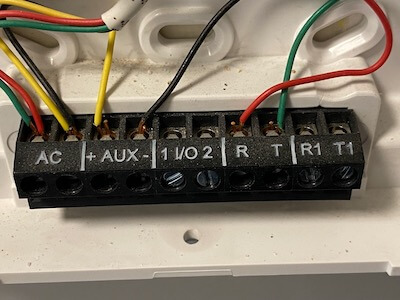
<p><img src="/images/scw9047-power.jpeg" alt="SCW9047 wall connection with power" class="align-right" />
This panel uses a 16.5V AC power supply. I <em>really</em> didn’t want to crawl around in our basement to unplug and pull the transformer out, but I did want to move the panel to my desk. I remembered that 7.2V DC battery inside the alarm panel, and reasoned that if the panel can run from battery backup, I should be able to plug it into my bench power supply and fake it.</p>

<p>Wrong! 7.2V DC didn’t do squat. The battery pack is 6x AA cells, the internet tells me they’re ~1.4V fully charged, so I bump the supply up towards 8.4V. Still nothing 😢 Subsequent experimenting (after fetching the AC transformer) shows that the panel needs the AC supply to start, and <em>then</em> it’ll happily run from the battery connector. 🤷‍♂️</p>

<p>As you might expect from a commercial product, it has some advanced behaviors. At first, it boosts the battery’s voltage up to 12V DC output voltage (the spec for the AUX +/-). After some time there’s an audible click, and the voltage drops down to match the “battery” supply voltage. My situation is artificial, I don’t think it matters for what I’m trying to do, but I found it confusing and think it’s worth documenting.</p>

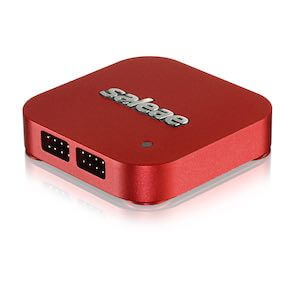
<p><img src="/images/saleae-8.jpeg" alt="Saleae Logic 8" class="align-right" /></p>
<h2 id="saleae-logic-8">Saleae Logic 8</h2>

<p>Digression: I recently purchased the <a href="https://usd.saleae.com/products/saleae-logic-8?variant=7076781031484">Saleae Logic 8</a>, using their <a href="https://blog.saleae.com/saleae-discounts/">enthusiast pricing</a> - almost entirely due to <a href="https://twitter.com/jaydcarlson/status/1492523127267594244">this @jaydcarlson tweet</a>. I still have a lot to learn about it, but it shows up later in my tale.</p>

<h2 id="uart-serial">UART Serial</h2>

<p class="cf">In the last week or two, I’d been thinking a lot about serial protocols. Mostly, I’d been using a variety of different devices to read UART serial debugging output for work on a pull request for <a href="https://esphome.io">esphome.io</a>, and doing a little bit of writing / control over the TX.</p>

<h3 id="-pc-link">🖥 PC-Link</h3>

<p>The manufacturer supports programming the panel with custom software, and the SCW9047 Installation Guide has a page recommending using a <a href="http://dlshelp.dsc.com/index.php?title=Communication_Tutorial_-_PC-Link">PC-Link</a> cable and their <a href="http://dlshelp.dsc.com/index.php?title=Main_Page">DLS software</a>. The documentation shows the 4 pin header to connect to, and recommends using a specific USB to Serial adapter if your computer doesn’t have a DB-9 / RS-232 port built in. I’m able to find discussion about making your own PC-Link cable, but I found it surprisingly hard to find a pinout that I trust. Here’s where I ended up:</p>

<ol>
  <li>RX</li>
  <li>GND (verified with multimeter)</li>
  <li>GND (according to my multimeter this is <em>not</em> connected to ground)</li>
  <li>TX</li>
</ol>

<p>There’s an indication on the board of which way to plug the connector in, and I found references that if you plug it in wrong it won’t work (as expected for TX-TX / RX-RX) but <em>won’t</em> break anything. However, I never found out what the signal voltage levels are. Wikipedia tells me <a href="https://en.wikipedia.org/wiki/RS-232">RS-232</a> can range up to ±25V, and so I’m pretty cautious at this point. The only device I have that’s safe to plug into a full voltage RS-232 signal is the Saleae (<a href="https://support.saleae.com/protocol-analyzers/analyzer-user-guides/using-async-serial/decode-rs-232-rs-485-and-rs-422">ref</a>). But when I do, there’s zero activity. In retrospect, that might have been because I wasn’t willing to bridge pins 2 &amp; 3, instead I was only using pin 2 as ground. Maybe pin 3 is an active low signal that needs to be shorted to pin 2 in order to enable serial debugging/logging output. At the time, I believed I needed the DLS software to drive the conversation, and it was quiet simply because I hadn’t sent any data to the board.</p>

<p>I contemplate buying the recommended USB to Serial adapter. However, at this point I take a little time to think and realize that without the software (or documentation of the serial protocol) even if I’m able to transmit to the alarm panel, I probably won’t get very far.</p>

<h3 id="unpopulated-4-pin-header">Unpopulated 4 Pin Header</h3>

<p>The alarm has spots for two additional headers, but they were empty: A four pin and an eight pin. I started with the four pin header (and, spoiler, never looked at the 8 pin). Using my multimeter, I found the ground pin (#4) and then read 3.3V on each of the remaining. Jackpot! Just a couple days previously I’d been looking at the Microchip PIC24 microcontroller on the <a href="https://www.sparkfun.com/products/12942">Bus Pirate</a>, and seeing a 3.3V line on the alarm panel had me very hopeful it was connected (possibly directly?) to the <a href="https://www.mouser.com/new/microchip/microchip-dspic33f-digital-signal-processors/">dsPIC33F</a> that I see on the board.</p>

<p>I’ve done some soldering kits (ex: I’m partway through the <a href="https://shop.evilmadscientist.com/productsmenu/922">555SE kit</a> and am having a blast). However this is my first time soldering something on a commercial project, and even though I’m nervous I rationalize that even if I totally ruin it, it’s not like the alarm was doing us a lot of good as-is.</p>

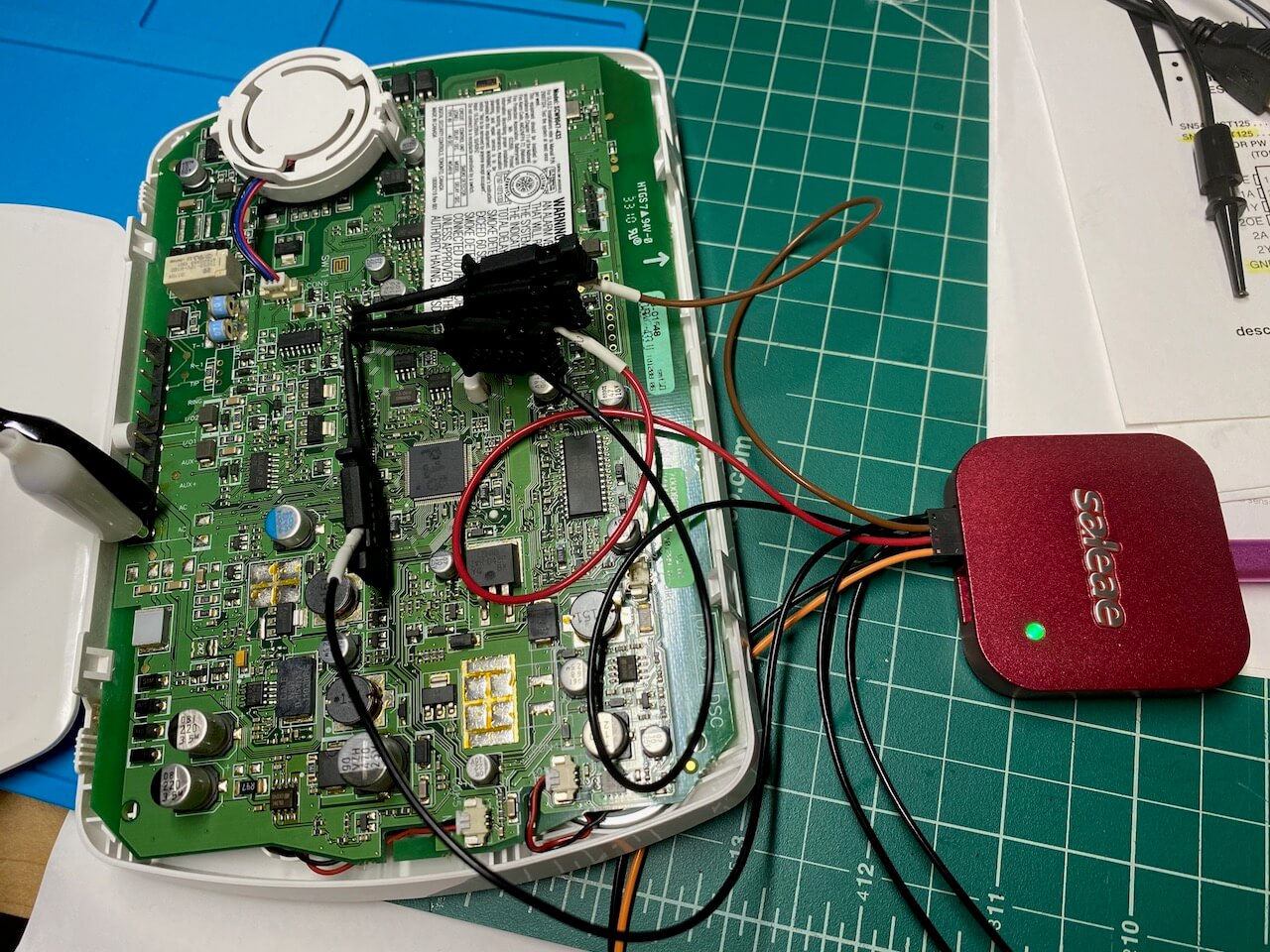
<p><img src="/images/scw9047-saleae.jpeg" alt="Saleae connected to the previously unpopulated 4 pin SCW9047 header" /></p>

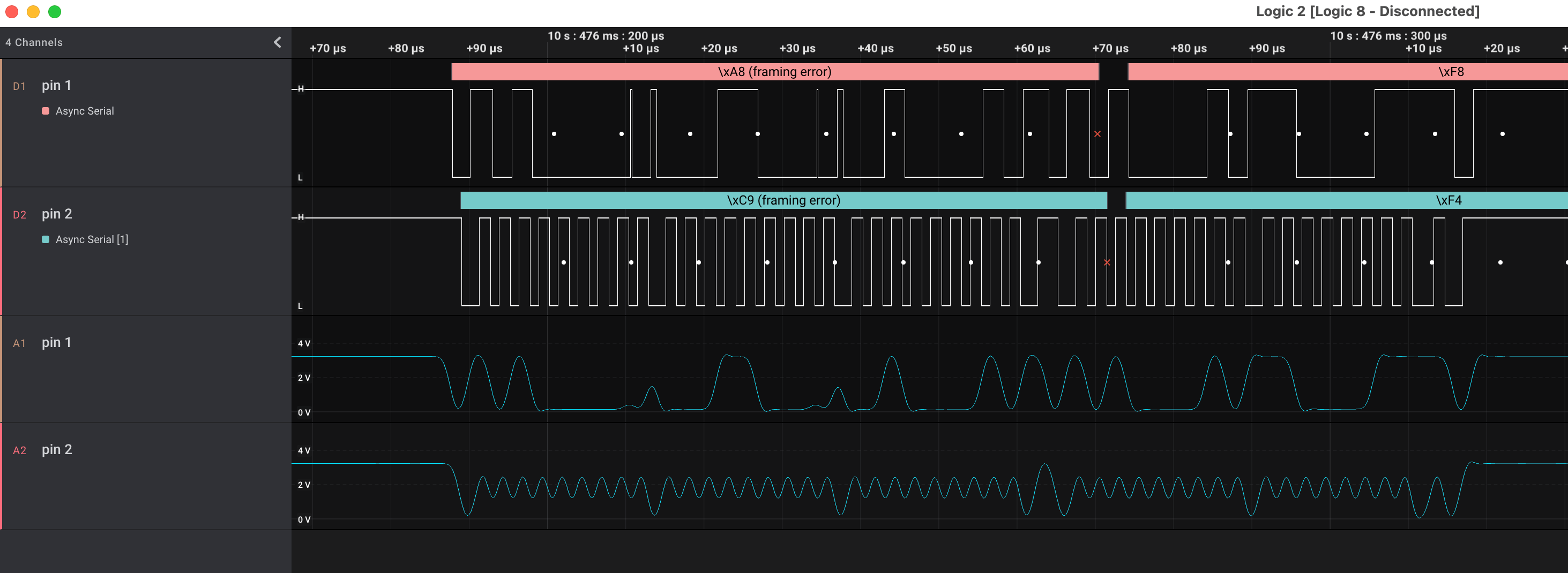
<p>I connect up the Saleae, and take some traces. Pin 1 is a constant 3.3V supply. Pins 2 and 3 <em>both</em> have activity. I’ve been fixated on finding a serial link, and assume I’m seeing both RX and TX from some components, but I cannot figure out the right settings to get a coherent decoding:</p>

<p><img src="/images/scw9047-as-serial.png" alt="SCW9047 in logic analyzer decoded as serial, with analog signal too" /></p>

<h3 id="uart-serial--ic">❌<del>UART Serial</del> ✅ I²C</h3>

<p>Like I said, I haven’t used the logic analyzer for much, and this is a new hobby. However, having added the analog readings to the display, I realize that “pin 2” 👆 looks suspiciously like a clock signal. In retrospect, it’s visible in the digital too, but 🤦‍♂️</p>

<p><img src="/images/scw9047-as-i2c.png" alt="SCW9047 in logic analyzer decoded as i2c, showing reads/writes from address 0x50" /></p>

<p>Ok, so it’s I²C. I’ve done <a href="https://github.com/esphome/esphome/pull/3307">some work</a> with an I²C component already, so this is a puzzle piece I recognize. The <a href="https://github.com/esphome/esphome/blob/dev/esphome/components/i2c/i2c.h">I2CDevice class</a> in esphome.io has a very consistent pattern to communicate with I²C chips: write a command (+ optional data) to an address, and then read the response from that address.</p>

<p>What I see is every single message is addressed to <code class="language-plaintext highlighter-rouge">0x50</code> and every message is a write followed by a read. Step one, google <code class="language-plaintext highlighter-rouge">i2c address 0x50</code>, and TIL there’s a website that shows <a href="https://i2cdevices.org/addresses/0x50">components with a specific address</a>.</p>

<p>The <strong>first</strong> suggestion is an EEPROM, and I quickly spot an <a href="https://www.st.com/resource/en/datasheet/m24c64-f.pdf">SO-8 labeled 24C64WP</a> on the alarm circuit board. I almost don’t need to confirm the address that chip uses, this feels right.</p>

<h3 id="-lightbulb">💡 Lightbulb!</h3>

<p>It really was a lightbulb moment: the realization that I’ve (probably) got access to every single persistent storage read &amp; write that the microcontroller makes, and I can see them on a timeline graph.</p>

<p>Well, sure. The EEPROM is full of binary data, 8 KB of it. There’s a large block of activity after boot, but then it quiets down. How do I provide meaning to the bits moving back and forth?</p>

<p>🤔 what are the odds that the code that checks an Installer Code attempt (I’d been running down a list of “common” installer codes) <strong>reads</strong> the actual Installer Code during the comparison? It’s got to be worth a shot… It’s the kind of easy-to-make coding error that the various <a href="https://github.com/stripe-ctf">Stripe CTFs</a> drilled home for me.</p>

<p>The expected code is 4 digits long. There are exactly two write/reads with a response length of 4 bytes at the moment I press the last button in my guess, and they’re both four decimal digits (no hex): <code class="language-plaintext highlighter-rouge">0x4392</code> and <code class="language-plaintext highlighter-rouge">0x0602</code>.</p>

<p>I can scarcely believe it. I try the first one, and I’m in. Days later, I still can’t believe that simply by connecting 3 wires to a very inviting looking location, the alarm panel has <strong>told</strong> me what the secret code is.</p>

<h1 id="-security">🔐 Security</h1>

<p>I achieved my goal! I can now selectively reprogram our system, using the comprehensive documentation in the Installer Guide.</p>

<p>After the elation subsides, I start to wonder about the security. I think it’d be almost trivial to build a device that spams the I²C command to read that specific memory location and display any result received. The wikipedia page for I²C tells me the protocol supports multiple controllers on a single bus. Could you enter someone’s house, pop the alarm panel off the wall, and take the installer code after a momentary contact to these header slots? Any firmware changes or model differences might require looking in multiple memory slots, but it seems like the problem space goes from 10<sup>4</sup> to something a <strong>lot</strong> smaller.</p>

<p class="notice">I haven’t checked if the installer code will disarm an active alarm. That’s okay, just pull the master code instead and/or additionally. Having unencrypted, un-obfuscated secrets read from memory on demand, combined with an oracle for whether or not I’ve found the correct bits means I think it’s easy to find the location (and contents) of those secrets.</p>

<h2 id="tampering-and-monitoring">Tampering and Monitoring</h2>

<p>Now, this blog post moves into speculation. It’s interesting to ponder given my training on computer security, although I’m not going to do it justice here. I think a solution to this physical insecurity has two parts.</p>

<p>The Hackaday teardown of a <a href="https://hackaday.com/2021/09/09/teardown-impassa-scw9057g-433-alarm-system/">SCW9057</a> pointed out the first half: the alarm panel has a switch that’ll detect when it’s pulled away from the wall. So the software has a method to detect physical tampering. However, “tampering” is also how the installer configures the device through PC-Link, or how the panel’s battery is replaced. The alarm panel cannot have a fatal reaction to tampering, like you might with a credit card reader (where it’s reasonable to wipe the private key material if the case is opened).</p>

<p>The second half is remote monitoring. If, and I don’t know if it’s part of the protocol used, the monitoring service can identify and handle untrustworthy alarm panels, I think it’s possible to provide pretty good security. A panel is trustworthy until it’s tampered with, and then the state is unknown. You’d need some out-of-band method to restore trust in it — an alarm panel reporting “just kidding, false alarm, they entered the Installer code” is nowhere near sufficient. A phone call to the homeowner who provides a passphrase acknowledging the panel was removed and things are fine seems closer, but your home owner may not be able to detect compromised hardware.</p>

<p>I think there’s still a hole in the system:</p>

<ul>
  <li>alarm is disarmed (ex: homeowner is home, evil maid finds himself alone with the panel)</li>
  <li>communication to monitoring service is cut</li>
  <li>alarm is tampered with, Installer and/or Master codes are read</li>
  <li>spoof &lt;whatever&gt; signal is necessary to tell the panel the tampering was fine
    <ul>
      <li>dial the wrong number, connect fake modem, whatever</li>
    </ul>
  </li>
  <li>reconnect monitoring service</li>
</ul>

<p>Since the alarm had no chance to alert the monitoring service, if the tampering fault can be cleared before reconnecting, the alarm panel believes the monitoring service is aware of the issue.</p>

<p>Can <em>that</em> be solved? Maybe something like a write-only, increment-only tamper counter. When the panel checks in with the monitoring service it notices the discrepancy, and can take action. If the panel never checks in again, the service can also take action.</p>

<h2 id="secrets-in-the-clear">Secrets in the Clear</h2>

<p>Is this just how embedded programming works? Secret values sent in the clear from storage to the microcontroller? I suspect often the answer is yes. It’s <em>possible</em> to do better, and I’ve got a couple <a href="https://www.adafruit.com/product/4314">ATECC608 breakouts</a> I’ve been meaning to play with. As a (primarily) iOS developer, the opportunity to poke directly at a Secure Element is interesting. If the alarm panel had one of these chips, the microcontroller <em>could</em> securely ask “is the installer code ABCD?”, as well as authenticate itself to the monitoring service.</p>

<p>I’m both happy the ATECC chips exist and are pretty cheap, but also sad that one of their primary use cases is for authenticated printer ink cartridges.</p>

<h2 id="-diy-remote-monitoring">👀 DIY Remote Monitoring</h2>

<p>I think I’ve got three main options for DIY remote monitoring.</p>

<ol>
  <li>Monitor sensors independent of the alarm system (aka <a href="https://www.home-assistant.io">Home Assistant</a> with something like <a href="https://community.home-assistant.io/t/home-assistant-add-on-rtl-433-with-mqtt-auto-discovery/260665">this</a>). This basically ignores the panel, and would use our internet connection to alert.</li>
  <li>Use existing cellular modem, contact a DIY monitoring server/receiver. It looks like the protocol used between the alarm system and the central monitoring system is documented, and there are existing open-source solutions. I think using Twilio allows me to receive calls from the alarm and turn them into alerts. This uses cellular (can’t cut the hard line), it has a battery back-up (still works if the power is out), and is cheaper than professional monitoring.</li>
  <li>Create a fake modem. I can replace the existing cellular modem, and just use our home internet to send out the alerts. We retain the alarm system arm/disarm UX, but would be vulnerable to internet outages.</li>
</ol>

<h2 id="-neighborhood-watch">🏡 Neighborhood Watch</h2>

<p>We actually have two alarm systems. The first one dates back to the 80s, and has a big bell mounted externally to the house (with tamper sensors, naturally). The second one uses the SCW9047, wireless sensors, and a cellular modem for remote monitoring.</p>

<p>I haven’t yet discovered what the old alarm bell sounds like, but I’m looking forward to using it as a deterrent, regardless of how I end up implementing remote monitoring.</p>]]></content><author><name>Dan Jackson</name></author><category term="adt" /><category term="saleae" /><category term="i2c" /><category term="security" /><category term="hardware" /><summary type="html"><![CDATA[tl;dr: I found an unpopulated header in our SCW9047 alarm panel, figured out that it tapped into an I²C bus, and was able to sniff the “super-secret” Installer Code.]]></summary></entry><entry><title type="html">Couples finance: mostly separate with shared bank account for household expenses</title><link href="https://www.djackson.org/couples-finance-mostly-separate-with-shared-bank-account-for-household-expenses/" rel="alternate" type="text/html" title="Couples finance: mostly separate with shared bank account for household expenses" /><published>2022-03-22T00:00:00-07:00</published><updated>2022-03-22T00:00:00-07:00</updated><id>https://www.djackson.org/couples-finance-mostly-separate-with-shared-bank-account-for-household-expenses</id><content type="html" xml:base="https://www.djackson.org/couples-finance-mostly-separate-with-shared-bank-account-for-household-expenses/"><![CDATA[<p>We’ve successfully used <a href="https://www.splitwise.com">Splitwise</a> to track contributions to a shared bank account, as well as payment of joint expenses from that bank account <em>and</em> by each individual.</p>

<h1 id="the-setup">The Setup</h1>

<p>My partner and I have not (yet) joined our finances. The money that each person earns and saves is theirs. I feel very fortunate that we have similar levels of disposable income, expectations for expenses, and (afaik) levels of responsibility. I suspect that’ll change sooner or later, but there hasn’t yet been a compelling reason to pool everything. In the beginning of our relationship, we mostly traded who would pay for things and never felt the need to be very precise about splitting things exactly equally.</p>

<p>Our situation <em>did</em> change when we purchased a home together. We decided to set up a joint bank account to auto-pay our mortgage &amp; split large bills in half, and it quickly occurred to me that tracking who had contributed what would be complicated without the help of software. I’ve done a crash course on accounting once or twice, and had an idea of what I wanted.</p>

<ul>
  <li>Expenses (mortgage, insurance, utility bills, etc) are paid by an individual, or from the shared bank account</li>
  <li>Direct Deposit contributions to the shared account were not in sync. My paychecks were bi-weekly, hers were twice a month (26 vs 24 paychecks in a year).</li>
  <li>Interest earned by money in the joint account is split equally for simplicity</li>
  <li>It should be easy for both parties to enter data and view balances</li>
</ul>

<h1 id="splitwise-to-the-rescue">Splitwise to the Rescue</h1>

<p><a href="https://www.splitwise.com">Splitwise</a> looked really close. It has a free tier, mobile &amp; web apps, and makes it easy to track expenses between friends. The only sticking point was the shared bank account. How to track the liabilities it owed to each of us?? Spoiler: create another Splitwise user to represent that account (<a href="http://feedback.splitwise.com/forums/162446-general/suggestions/3117255-shared-fund-for-house">splitwise feedback site</a>).</p>

<p>Once I’d set up a Splitwise user named after our bank account and added it to our household group (2 people and the bank account), here are the common scenarios:</p>

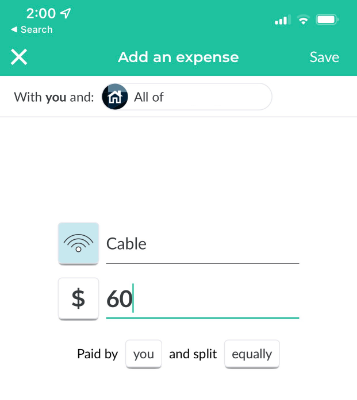
<h2 id="expense-paid-by-individual">Expense paid by individual</h2>

<ul>
  <li>Payer: the individual</li>
  <li>Split: equally between the people</li>
</ul>

<p><img src="https://www.djackson.org/images/add-expense.png" alt="screenshot of add an expense page" /></p>

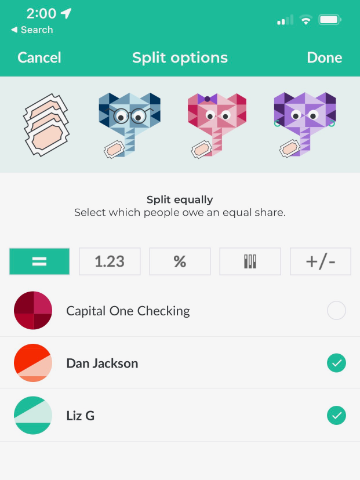
<h2 id="expense-paid-by-shared-account">Expense paid by shared account</h2>

<ul>
  <li>Payer: the bank account</li>
  <li>Split: equally between the people</li>
</ul>

<p><img src="https://www.djackson.org/images/split-options.png" alt="screenshot of choose split options" /></p>

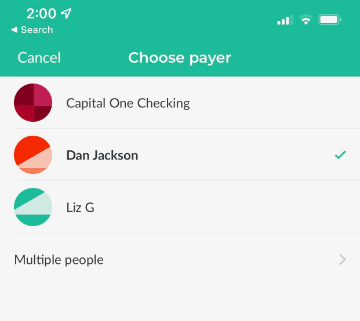
<h2 id="deposit-by-individual-into-bank-account">Deposit by individual into bank account</h2>

<ul>
  <li>Payer: the individual</li>
  <li>Split: the bank account</li>
</ul>

<p><img src="https://www.djackson.org/images/choose-payer.png" alt="screenshot of choose payer options" /></p>

<h2 id="interest-earned-by-bank-account">Interest earned by bank account</h2>

<ul>
  <li>Payer: multiple people, the people</li>
  <li>Split: the bank account</li>
</ul>

<p><img src="https://www.djackson.org/images/multiple-payers.png" alt="screenshot of multiple payers" /></p>

<p>You might be asking “<strong>why</strong> track the interest?” Especially since it amounts to maybe $20 a year.</p>

<p>I find it really useful because then the Splitwise calculation “amount owed by bank account” <strong>matches</strong> the balance of the bank account according to our bank. It’s nice when the numbers reconcile accurately, and helps build trust that the amount owed by each person is accurate. It’s helped find errors in amounts, as well as errors in the payer/split settings.</p>

<p>Interest is the use case that happens every month, but it also came in handy one time when we got an insurance refund check.</p>

<h2 id="how-much-of-the-money-in-the-account-belongs-to-each-person">How much of the money in the account belongs to each person?</h2>

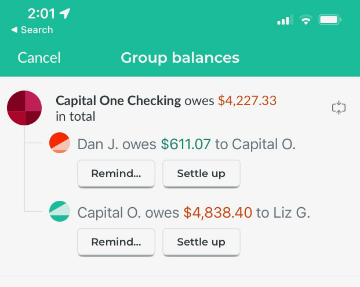
<p>With “simplify debts” turned off, the Group Balances -&gt; “Bank Account owes $XX in total” is then broken down by each person.</p>

<p><img src="https://www.djackson.org/images/group-balances.png" alt="screenshot of group balances view" /></p>

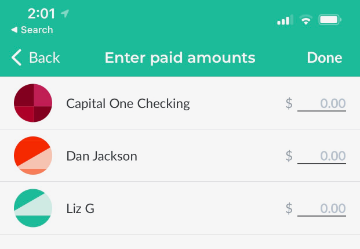
<p>(It’s been a while since I’ve had a direct deposit in the account, and in the above screenshot <em>all</em> of the money and more in the account came from my partner. I’ve been making up for it by paying other bills)</p>

<h1 id="next-steps">Next Steps?</h1>

<p>Something that’s been nice about this setup is that it scales well. The primary purpose was to equitably split the mortgage, but as we’ve gotten used to it, it has been easy to add any one-off or recurring expenses.</p>

<p>I suspect we’ll have a shared credit card soon, which would make it even easier to split restaurants (etc). Instead of entering every meal (ugh, who has time for that?), just use the monthly statement to roll them up into a single entry that’s split in half between us.</p>

<p>Before we know it, we’ll have our joint accounts paying for everything that’s shared, we’ll work together on savings &amp; retirement goals, and eventually erase the distinction between my money and hers. Until then, thanks Splitwise!</p>

<h1 id="2024-update">2024 Update</h1>

<p>Late last year, Splitwise added limits on the number of expenses that a free account can add per day. We have <em>maybe</em> 10 per month, but since we don’t stay on top of it, this limit is painful. Not painful enough that we’d want to pay for a premium account ($5/mo or $40/yr), because there’s no way we get that much value from it.</p>

<p>I found a reddit comment that the older Android clients don’t enforce the daily expense entry limits. It turns out their publicly documented API doesn’t enforce it either. So I wandered over to https://dev.splitwise.com/ and entered almost a year’s worth of expenses in an afternoon, using my <a href="https://paw.cloud">API client</a> of choice 🎉</p>]]></content><author><name>Dan Jackson</name></author><category term="personal finance" /><category term="accounting" /><category term="splitwise" /><category term="api" /><summary type="html"><![CDATA[We’ve successfully used Splitwise to track contributions to a shared bank account, as well as payment of joint expenses from that bank account and by each individual.]]></summary></entry><entry><title type="html">My First Gem: installing gem documentation into Dash</title><link href="https://www.djackson.org/my-first-gem-installing-gem-documentation-into-dash/" rel="alternate" type="text/html" title="My First Gem: installing gem documentation into Dash" /><published>2022-03-06T00:00:00-08:00</published><updated>2022-03-06T00:00:00-08:00</updated><id>https://www.djackson.org/my-first-gem-installing-gem-documentation-into-dash</id><content type="html" xml:base="https://www.djackson.org/my-first-gem-installing-gem-documentation-into-dash/"><![CDATA[<p>I’ve been a long time user of <a href="https://kapeli.com/dash">Dash.app</a>. Most of my professional development happens on iOS, and Dash + <a href="https://www.alfredapp.com">Alfred</a> worked their way into my workflow, even though I was previously entirely satisfied with the built-in Xcode documentation viewer. My passion / desire for code documentation goes back to the days where I’d added <a href="https://github.com/tomaz/appledoc">appledoc</a> generation to our Xcode builds &amp; was publishing a docset of our application code through CI. To this day, I don’t know if the handful of other devs on the project used it, nor whether it remained working for very long after I left (which yes, I know means it was probably a bad use of my time, although I <em>think</em> the build failures for missing documentation were a net positive).</p>

<p>With that said, I’ve been less impressed with Dash as soon as I left the Apple documentation. This includes moderate usage of 3rd party libraries. It’s not necessarily a fault of the app, but more an expectation from me that I shouldn’t have to manage documentation. When you’re doing mostly vanilla Apple frameworks, enough functionality is built in. Apple’s documentation, while sometimes badly lacking, does a fair job at marking API availability and it’s possible to use the latest SDK to develop against older versions of the OS.</p>

<p>What I <em>really, really</em> want is to be able to view all the documentation for a project, and only the documentation for that project. Dash has “Search Profiles” that can be manually managed: adding / removing / updating docsets, and making it easy to constrain a search to a specific profile. I’ve done that when I primarily work on a single project: here’s the iOS docs and here are the handful of libraries it currently uses, which are updated infrequently. It 99% does <strong>not</strong> work for random projects that I find and want to make a change or two to. I have been super frustrated trying to poke at random Ruby projects, and trying to look up symbols. I think some of the problem is that other ecosystems are pretty granular, some that they publish a new docset for every minor revision, and (at least with Ruby) some that when classes are extensible there are <em>too many</em> results (right now, searching ‘ruby: string’ gets <strong>19</strong> results on my machine).</p>

<p>Just over two weeks ago, it occurred to me that there might be a better way. What if I could programmatically update a search profile, and have it match a project’s dependencies?</p>

<p>Unfortunately, Dash.app doesn’t expose the required APIs. You <em>can</em> ask for a specific docset &amp; version to be installed, but that’s the extent of it. I’ve emailed with a feature request to do more, and the developer says it’s on his todo list.</p>

<h2 id="bundler">Bundler</h2>

<p>While I was looking for a pre-existing solution, I found a ~10 line <a href="https://gist.github.com/invalidusrname/c82915bc3596f265bda71a67006d20fe">ruby script</a> that installed all the documentation for a project’s gems, using <code class="language-plaintext highlighter-rouge">bundler</code>. I was able to make an <a href="https://gist.github.com/e28eta/0df41538eca1dc8b286c7d5b6d6072ed">immediate improvement</a>: using <code class="language-plaintext highlighter-rouge">open -g</code> so that it didn’t bring Dash.app to the foreground every 3 seconds.</p>

<p>I’d like to think I’ve improved it further, in my <a href="https://rubygems.org/gems/bundler-install_dash_docs">very first gem</a>, <code class="language-plaintext highlighter-rouge">bundler-install_dash_docs</code>:</p>

<ul>
  <li>reads the bundler lockfile instead of executing <code class="language-plaintext highlighter-rouge">bundle show</code></li>
  <li>properly escapes url parameters</li>
  <li>properly handles shell / system command</li>
  <li>adds additional execution modes: dry-run, different verbosity options, all gems vs only dependencies</li>
</ul>

<p>This is written as a bundler plugin, because bundler is “the” dependency management solution for Ruby. Right now it requires user action, but in theory it could be done automatically if the plugin is installed: download new version of gem &amp;&amp; install new documentation into Dash. As a visitor to the ecosystem, I’m not sure what a perfect workflow looks like. However, I have visions of a single command loading up all the documentation for a single project, and making it searchable while excluding anything else installed on the same machine. This isn’t a bundler-specific solution: I’d immediately want the same thing for any language / ecosystem with versioned libraries that Dash knows how to fetch documentation for.</p>

<h2 id="unsupported-hack">Unsupported Hack?</h2>

<p>I poked at Dash.app: the custom url schemes, the (basically empty) Applescript dictionary, and concluded anything else was impossible at this stage. That’s dumb, because Dash obviously stores the Search Profile information <em>somewhere</em>, and with enough effort it should be possible to edit it. On my second try, I found it in <code class="language-plaintext highlighter-rouge">~/Library/Preferences/com.kapeli.dashdoc.plist</code> (I think it’s odd most of the data is stored in <code class="language-plaintext highlighter-rouge">Application Support</code>, but this is in <code class="language-plaintext highlighter-rouge">Preferences</code> 🤷‍♂️).</p>

<p>I’ve probably scratched my itch sufficiently for now, but it’s tempting to go further.</p>

<h2 id="other-languages">Other languages</h2>

<p>Why bundler? Because that’s what I was using when this occurred to me. Any combination of “versioned dependencies” and “robust Dash support” would benefit from something similar. Should it actually be a plugin to each dependency manager? Or is a Dash user going to want to install one tool that works similarly across ecosystems? (As I write that question, I feel like the answer is obvious, and <em>not</em> aligned with my current work. Oh well).</p>]]></content><author><name>Dan Jackson</name></author><category term="documentation" /><category term="development" /><category term="ruby" /><category term="bundler" /><category term="dash.app" /><summary type="html"><![CDATA[I’ve been a long time user of Dash.app. Most of my professional development happens on iOS, and Dash + Alfred worked their way into my workflow, even though I was previously entirely satisfied with the built-in Xcode documentation viewer. My passion / desire for code documentation goes back to the days where I’d added appledoc generation to our Xcode builds &amp; was publishing a docset of our application code through CI. To this day, I don’t know if the handful of other devs on the project used it, nor whether it remained working for very long after I left (which yes, I know means it was probably a bad use of my time, although I think the build failures for missing documentation were a net positive).]]></summary></entry><entry><title type="html">Blogging with Jekyll (+ puma-dev, gh-pages, cloudflare)</title><link href="https://www.djackson.org/blogging-with-jekyll-puma-dev-gh-pages-cloudflare/" rel="alternate" type="text/html" title="Blogging with Jekyll (+ puma-dev, gh-pages, cloudflare)" /><published>2022-02-15T10:15:00-08:00</published><updated>2022-02-15T10:15:00-08:00</updated><id>https://www.djackson.org/blogging-with-jekyll-puma-dev-gh-pages-cloudflare</id><content type="html" xml:base="https://www.djackson.org/blogging-with-jekyll-puma-dev-gh-pages-cloudflare/"><![CDATA[<p>I’d successfully resisted for 5 years, but here comes the post where I describe this blog’s current technology stack. The short answer is that I’m using GitHub Pages, but I’ve layered enough complexity onto it that I want to write it down for future me.</p>

<h1 id="-github-pages"><a href="https://pages.github.com"><i class="fab fa-fw fa-github" aria-hidden="true"></i> GitHub Pages</a></h1>

<blockquote>
  <p>GitHub Pages is a static site hosting service that takes HTML, CSS, and JavaScript files straight from a repository on GitHub, optionally runs the files through a build process, and publishes a website. <a href="https://docs.github.com/en/pages/getting-started-with-github-pages/about-github-pages#about-github-pages">[ref]</a></p>
</blockquote>

<blockquote>
  <p>We recommend Jekyll, a static site generator with built-in support for GitHub Pages and a simplified build process. <a href="https://docs.github.com/en/pages/getting-started-with-github-pages/about-github-pages#static-site-generators">[ref]</a></p>
</blockquote>

<p>I can’t remember if I heard of <a href="https://pages.github.com">GitHub Pages</a> or <a href="https://jekyllrb.com">Jekyll</a> (or maybe <a href="http://octopress.org">Octopress</a>?) first, but a ruby-based static site generator with free build &amp; hosting is totally sufficient for me, especially when it’s combined with GitHub’s authn/authz and git’s version control. I don’t really need GitHub’s <a href="https://docs.github.com/en/authentication/securing-your-account-with-two-factor-authentication-2fa/configuring-two-factor-authentication#configuring-two-factor-authentication-using-a-security-key">2FA</a> protecting this content, but I almost cannot imagine creating content without version control and <code class="language-plaintext highlighter-rouge">git</code> is the one I know the best at this point.</p>

<h2 id="-jekyll"><a href="https://jekyllrb.com"><i class="fas fa-fw fa-vial" aria-hidden="true"></i> Jekyll</a></h2>

<p><a href="https://jekyllrb.com">Jekyll</a> provides the underlying static site generator, turning posts written in (mostly) markdown into the blog content. I benefit from a variety of <a href="https://pages.github.com/versions/">plugins that GitHub Pages supports</a>, but can’t add additional ones.</p>

<p>However, bare Jekyll would require a lot of additional work: creating the site structure, navigation, <code class="language-plaintext highlighter-rouge">&lt;head&gt;</code> content, stylesheets, etc. That’s where the Jekyll theme comes in.</p>

<h2 id="-minimal-mistakes-theme"><a href="https://mmistakes.github.io/minimal-mistakes/"><i class="fas fa-fw fa-pencil-alt" aria-hidden="true"></i> Minimal Mistakes theme</a></h2>

<blockquote>
  <p>A flexible two-column Jekyll theme. Perfect for building personal sites, blogs, and portfolios.</p>
</blockquote>

<p>I chose <a href="https://mmistakes.github.io/minimal-mistakes/">Minimal Mistakes</a> for my theme. It has many <a href="https://mmistakes.github.io/minimal-mistakes/docs/configuration/">configuration options</a>, allowing pieces of functionality to be turned on/off and otherwise customized. ex: set up author profiles with various social media links, or choose between several ways of adding reader comments to pages. All that’s required is to edit the <a href="https://github.com/mmistakes/minimal-mistakes/blob/4.24.0/_config.yml">default <code class="language-plaintext highlighter-rouge">_config.yml</code></a></p>

<p>Another customization option is to <a href="https://mmistakes.github.io/minimal-mistakes/docs/overriding-theme-defaults/">override specific pieces</a> of the theme code: some that are “supported” and others that require manual changes when I update to a newer version of the theme.</p>

<p>An example of a “supported” extension point is a <a href="https://mmistakes.github.io/minimal-mistakes/docs/configuration/#analytics">custom analytics provider</a>, which requires a <code class="language-plaintext highlighter-rouge">_config.yml</code> setting <em>and</em> putting the necessary code into <code class="language-plaintext highlighter-rouge">_includes/analytics-providers/custom.html</code> (which is blank in the theme’s files and automatically included in the right place via the config setting).</p>

<p>The “unsupported” version is to simply copy a theme file into the blog’s repository, and make any/all changes desired. The local copy takes priority over the theme’s file. Unfortunately, it requires manually reconciling my changes with any changes in the theme when upgrading to a new version of the theme. I’ve done this with a couple of files, like <code class="language-plaintext highlighter-rouge">_includes/scripts.html</code> to change the order of other includes.</p>

<p>As a result of these features and customization options, it feels like I spend more time working with the theme’s documentation and code than I do with Jekyll. The theme is also 100% responsible for the look &amp; feel of the site.</p>

<h2 id="-custom-domain"><i class="fas fa-fw fa-globe" aria-hidden="true"></i> Custom Domain</h2>

<p>I honestly don’t remember any details of setting up my custom domain. GitHub has <a href="https://docs.github.com/en/pages/configuring-a-custom-domain-for-your-github-pages-site/about-custom-domains-and-github-pages">documentation</a> on the process, which I’m sure I’d follow if I had to set it up again.</p>

<p>I’m using <a href="https://www.cloudflare.com">Cloudflare</a> for DNS on my domain and as a CDN for the blog. I started with Cloudflare for <a href="/dnsmasq-is-my-favorite-router-feature/">dynamic dns</a>, and as far as I remember there wasn’t any reason not to keep using it when I set up the blog. I believe Cloudflare has a setting that forces https that’s enabled for the blog.</p>

<h1 id="-shipping-new-content"><i class="fas fa-fw fa-ship" aria-hidden="true"></i> Shipping New Content</h1>

<p>GitHub Pages makes this easy. I simply <code class="language-plaintext highlighter-rouge">git push</code> to the remote, and GitHub builds and deploys a new version of the site. It’s been a while since I’ve encountered an error building, but <a href="https://docs.github.com/en/pages/setting-up-a-github-pages-site-with-jekyll/about-jekyll-build-errors-for-github-pages-sites">logs are available for troubleshooting</a> and it’s usually very fast.</p>

<p>It’s so easy that I’ve gotten into the habit of simply writing/editing posts on my iPad and pushing them live directly. Once they build, I can fix any typos or other mistakes and redeploy.</p>

<h2 id="ios--working-copy-and--editorial">iOS: <i class="fas fa-fw fa-fingerprint" aria-hidden="true"></i> Working Copy and <i class="fas fa-fw fa-asterisk" aria-hidden="true"></i> Editorial</h2>

<p>I don’t spend much time sitting in front of a computer during my personal time. I’m far more likely to use my iPad Pro. For the blog, I mostly rely on two apps.</p>

<p><a href="https://apps.apple.com/us/app/working-copy-git-client/id896694807?itsct=apps_box_link&amp;itscg=30200">Working Copy</a> is a fantastic git client for iOS that I highly recommend. I’m not doing anything hard with the blog, being able to pull the latest code, make changes, and push is sufficient.</p>

<p>Working Copy introduced me to <a href="https://apps.apple.com/us/app/editorial/id673907758?itsct=apps_box_link&amp;itscg=30200">Editorial</a> via the <a href="https://workingcopyapp.com/manual/edit-in-app">instructions for editing in another app</a>. Editorial also comes with glowing reviews on <a href="https://www.macstories.net/tag/editorial/">MacStories</a>. I set up some basic automation to interoperate with Working Copy, and a <a href="editorial://add-workflow?workflow-data-b64=eNrtV21v0zAQ_ivGEhpISdV1Y4N8qUYZ2tBeqq5iQuuE3PjaRnXsEDsrJcp_5-wk3apuUIY0GKyRovR899zdc-fknNMoVJIGtP-pe9g5PTnz946OPp_3Dvv7jUSOqUdZaCIlNQ0ucpqwTMNbGKkUepmUESoEIyY0eOXSeWQmKjNnEzXDtS5LWQwGUr3QCjNtVNyPjAD0ieihYBqX6blKpyOhZnvOWw--ZKBNH76aQ5lkhlr8a7Ccxpkw0VEk4TSx-jRoetSgtl0z88SCM37FZAjcgqC9UVOQPSbHYAGKWp1S-1jF01XakDK4ct05L104tywzqqPSFFyU-5INBXAamDTD3KYwHyqW8sbWIl2nz5LIMBF9Yz-yaS1sdAJCdCYQTpHCu9R3F-q1qO-ybhZF4T1cnc4MevjI0shGuVIkic9okiCrvqlYvWIig3WrRPOmRzYLVCu74LpqbfqwiXYmNqYO06tZhiisu3DzQYN6H0neg0SwcDWqtJLfaz-MEPjXLdu16WJP_s9sPHti44al98TGDcvgH2TDvz8d5M_SsdZHbBQJeOwfsZ9OVfUcZNhYe-T6Tn9nuFod1f6-6lZJPtbhJAVm4ARm71SYxSBXC4sjvrHytVPb2qlye84ROjg-Rp18u7kkPDhwwu0lobY85q-2KmFFbN6q8ZaGwXz3TW0cZqlWqZVtLQPO8efEr5fEnDvnrSVhHDvQnTvq4vv-QAo2R84DopFyAQPpYglIeyAdBGn7eJF2gBcuYvgBuWhfDhBqKCI9AR4QO4sPpENDHbyV7y8BZTety3HrNopvSbJOZ-kVlDdXWbrRgb67GjG3QpWALE8QRXHp1T2P_UI-wHQuBLHnHsTkoMM0qnYpLbtKE0aGgskpsZUjM2zZ2moCjGN_kUgSMwES23U8GWGfiTmxPoGTkRKo0yDdVMWJ0fg_JS4FwiR37xbywh6SYjwchUygIeNck42hUOMNwqx3VHrZoMV3eYIX8w~~">workflow to create a new post</a> with some basic <a href="https://jekyllrb.com/docs/front-matter/">front matter</a> and an (approximately) correctly formatted filename.</p>

<p>🤞 that both of these apps continue to be maintained. Editorial doesn’t look like it’s changing much, so I continue to be afraid it’ll stop working sooner or later, but so far so good.</p>

<h2 id="-macos-jekyll-build"><i class="fas fa-fw fa-tools" aria-hidden="true"></i> macOS Jekyll Build</h2>

<p>Ahhh, here’s my opportunity to overcomplicate things! I blame most of the complication on an old project called <a href="https://web.archive.org/web/20210622195420/http://pow.cx/manual.html">Pow</a>, which has been replaced by <code class="language-plaintext highlighter-rouge">puma-dev</code></p>

<h3 id="-puma-dev"><a href="https://github.com/puma/puma-dev"><i class="fas fa-fw fa-cat" aria-hidden="true"></i> puma-dev</a></h3>

<blockquote>
  <p>Puma-dev is the emotional successor to pow. It provides a quick and easy way to manage apps in development.</p>
</blockquote>

<p>I like <a href="https://github.com/puma/puma-dev">puma-dev</a> because it combines two features: reverse proxy and local DNS. I don’t know if it’s best-of-breed these days, I didn’t spend long looking.</p>

<h4 id="-reverse-proxy"><i class="fas fa-fw fa-exchange-alt" aria-hidden="true"></i> Reverse Proxy</h4>

<p>puma-dev provides a reverse proxy, and it’s configured by adding files to <code class="language-plaintext highlighter-rouge">~/.puma-dev/</code>, with a variety of possibilities:</p>

<ul>
  <li>symlink to directory
    <ul>
      <li>loads <code class="language-plaintext highlighter-rouge">config.ru</code> out of that directory, and manages the associated <a href="https://github.com/rack/rack">rack</a> application</li>
      <li>statically serves files from <code class="language-plaintext highlighter-rouge">public/</code>, for all others</li>
    </ul>
  </li>
  <li>text file
    <ul>
      <li><code class="language-plaintext highlighter-rouge">port</code></li>
      <li><code class="language-plaintext highlighter-rouge">address:port</code></li>
    </ul>
  </li>
</ul>

<p>For local development, this is enough configuration for me. I love how simple it is. puma-dev listens on ports 80 and 443 by default, and uses a wildcard cert to provide trusted TLS connections. The file/symlink’s name (ex: <code class="language-plaintext highlighter-rouge">blog</code>) is mapped to the domain (ex: <code class="language-plaintext highlighter-rouge">http://blog.test/</code>)</p>

<p>Notice that <code class="language-plaintext highlighter-rouge">rack</code> applications are provided with some extra features. This is because the tool comes from the ruby community, but IMO it remains useful for any local web development work I’m doing.</p>

<h4 id="-dns-resolver"><i class="fas fa-fw fa-map-signs" aria-hidden="true"></i> DNS Resolver</h4>

<p>The other half of the magic is providing a DNS resolver for the chosen top level domain (ex: <code class="language-plaintext highlighter-rouge">test</code>), mapping lookups to <code class="language-plaintext highlighter-rouge">127.0.0.1</code>. Pow ran into trouble because it was using <code class="language-plaintext highlighter-rouge">dev</code> and then Google purchased that TLD! So we’ve all learned our lesson and the default is now <code class="language-plaintext highlighter-rouge">.test</code> - one of the 4 reserved TLDs - but good luck getting everyone to conform and so it’s configurable.</p>

<p>I continue to be amazed at how easy this is to setup: just drop <code class="language-plaintext highlighter-rouge">/etc/resolver/test</code> onto disk with the <code class="language-plaintext highlighter-rouge">nameserver</code> and <code class="language-plaintext highlighter-rouge">port</code> (<a href="https://web.archive.org/web/20150923013656/https://developer.apple.com/library/mac/documentation/Darwin/Reference/ManPages/man5/resolver.5.html">man page</a>)</p>

<h4 id="-launchdplist"><i class="fas fa-fw fa-key" aria-hidden="true"></i> launchd.plist</h4>

<p><code class="language-plaintext highlighter-rouge">puma-dev</code> listens on all interfaces when it installs itself. I’ve manually changed my install to only listen to the localhost interface, and <a href="https://github.com/puma/puma-dev/issues/306">filed a feature request</a> with the project. This prevents other machines accessing my WIP development code (which for the entirely static blog would not be particularly worrisome), and makes me feel better about having it running all the time.</p>

<h4 id="-app-management"><i class="fas fa-fw fa-undo" aria-hidden="true"></i> App management</h4>

<p>Since <code class="language-plaintext highlighter-rouge">puma-dev</code> manages the app lifecycle, I need a way to control it. My most common operation is to <code class="language-plaintext highlighter-rouge">touch tmp/restart</code> in the blog’s directory, which causes <code class="language-plaintext highlighter-rouge">puma-dev</code> to shutdown the app. It’s started up on the next request, and that makes it easy to pick up <code class="language-plaintext highlighter-rouge">_config.yml</code> changes.</p>

<h3 id="-rack-jekyll"><a href="https://github.com/adaoraul/rack-jekyll"><i class="fas fa-fw fa-server" aria-hidden="true"></i> rack-jekyll</a></h3>

<blockquote>
  <p>Transform your Jekyll app into a Rack application.</p>
</blockquote>

<p>I use <a href="https://github.com/adaoraul/rack-jekyll">rack-jekyll</a> for automatic generation of the static site files. Since <code class="language-plaintext highlighter-rouge">puma-dev</code> (and <code class="language-plaintext highlighter-rouge">pow</code> before it) knows how to launch / shutdown <code class="language-plaintext highlighter-rouge">rack</code> applications, it becomes a pretty easy workflow to edit files, load them in the browser, and then know the process will stop running soon after I’m done.</p>

<p>I’ve been living with a warning from GitHub that my repo has an insecure version of <code class="language-plaintext highlighter-rouge">rack</code>, because the gem hasn’t been released in a long time, but using the latest version via git fixes that.</p>

<p>I also ran into some <em>weird</em> behaviors when running through <code class="language-plaintext highlighter-rouge">puma-dev</code> that were solved by requiring <code class="language-plaintext highlighter-rouge">github-pages</code> in my <code class="language-plaintext highlighter-rouge">config.ru</code>. It loads a variety of plugins, changes some configuration settings, and basically ensures I’m building similarly to the way GitHub Pages will when I push the code.</p>

<p>I’ve been poking at the jekyll config passed into the rack app, turning up the logging and showing any/all unpublished/incomplete posts. I don’t yet know if it’s better to see what’s in progress, or better to have a live preview of production. Maybe that’s something I change as needed.</p>

<h3 id="-jekyll-compose"><a href="https://github.com/jekyll/jekyll-compose"><i class="fas fa-fw fa-edit" aria-hidden="true"></i> jekyll-compose</a></h3>

<p><a href="https://github.com/jekyll/jekyll-compose">jekyll-compose</a> provides some basic <code class="language-plaintext highlighter-rouge">jekyll</code> command line additions that make it easy to create drafts &amp; posts with specific front matter, and correct names. I definitely forget that this exists, and end up either creating posts through my workflow on Editorial or copying from an existing file.</p>

<p>However, if I remember or if I re-read this post, <code class="language-plaintext highlighter-rouge">bundle exec jekyll {post,draft} "[title]"</code> seems like a better way to go about it. The <code class="language-plaintext highlighter-rouge">publish</code>, <code class="language-plaintext highlighter-rouge">unpublish</code>, and <code class="language-plaintext highlighter-rouge">rename</code> commands look good too.</p>

<h1 id="-installing"><i class="fas fa-fw fa-download" aria-hidden="true"></i> Installing</h1>

<p>How I would probably reinstall this on a mac</p>

<ol>
  <li>Install &amp; setup <code class="language-plaintext highlighter-rouge">git</code></li>
  <li>Figure out ruby &amp; versioning. I’m currently trying <a href="http://asdf-vm.com">asdf</a>, and its <a href="http://asdf-vm.com/guide/getting-started.html">Getting Started Guide</a> looks good. I don’t think the specific ruby version matters much, I’m using some arbitrary new, stable version.</li>
  <li><code class="language-plaintext highlighter-rouge">bundle install</code> from blog’s repo to install the necessary gems.</li>
  <li>Install <a href="https://github.com/puma/puma-dev">puma-dev</a> following their instructions. Ensure <code class="language-plaintext highlighter-rouge">~/Library/LaunchAgents/io.puma.dev.plist</code> is binding to <code class="language-plaintext highlighter-rouge">127.0.0.1</code> instead of <code class="language-plaintext highlighter-rouge">0.0.0.0</code></li>
  <li><code class="language-plaintext highlighter-rouge">puma-dev link -n "blog" [path]</code> to add the symlink for puma-dev</li>
</ol>

<hr />

<h3 class="no_toc" id="postscript">Postscript</h3>

<p>Well, I’ve written what I wanted: a tour of the various moving pieces and why each one is important to me. I think this is what I’ll find valuable in the future, but now I have questions:</p>

<ul>
  <li>Why isn’t this simply in the README.md of the blog?</li>
  <li>Will I update this post, or write follow ups as this changes?</li>
  <li>Is this the level of documentation that I’d want to represent me to future potential employers?</li>
  <li>Other than hypothetical future me, who would get any value from reading this?</li>
</ul>

<p>🤷‍♂️</p>]]></content><author><name>Dan Jackson</name></author><category term="blog" /><category term="jekyll" /><category term="puma-dev" /><category term="gh-pages" /><category term="cloudflare" /><category term="minimal mistakes" /><summary type="html"><![CDATA[I’d successfully resisted for 5 years, but here comes the post where I describe this blog’s current technology stack. The short answer is that I’m using GitHub Pages, but I’ve layered enough complexity onto it that I want to write it down for future me.]]></summary></entry><entry><title type="html">OpenWrt + Pi-Hole on Rpi Zero over USB</title><link href="https://www.djackson.org/openwrt-2B-pi-hole-on-rpi-zero-over-usb/" rel="alternate" type="text/html" title="OpenWrt + Pi-Hole on Rpi Zero over USB" /><published>2021-08-17T08:55:33-07:00</published><updated>2021-08-17T08:55:33-07:00</updated><id>https://www.djackson.org/openwrt-+-pi-hole-on-rpi-zero-over-usb</id><content type="html" xml:base="https://www.djackson.org/openwrt-2B-pi-hole-on-rpi-zero-over-usb/"><![CDATA[<p>Several years ago, I decided to try out network-level ad blocking at home. I had an extra Raspberry Pi Zero W, and a coworker mentioned they were happy with <a href="https://pi-hole.net">Pi-hole</a>. I spent several days messing with our network setup, and finally got something I was happy with. At the time, I didn’t take great (any?) notes, and while in theory I knew what I’d done and how to reproduce it, now that I’ve re-created the setup for new router hardware I’m going to add it to this blog. This will be heavy on rationale, and light on step-by-step since I find that’s most helpful for me.</p>

<h3 id="unifi-ap">UniFi AP</h3>
<p>I jumped on the UniFi bandwagon in 2017, after we started getting 802.11ac devices. I like that it’s independently upgradable, and that I can run a single wire to a central location to achieve decent Wifi coverage at our house. The fact that it took me two years before I chose that spot and ran that wire in our new home is a different conversation 😭. I expect to get many years out of it, and hope that I’ll be able to just drop in a replacement when the time comes.</p>

<h3 id="router">Router</h3>
<p>Until a couple days ago, I’ve been using the same router since 2009 (<a href="https://openwrt.org/toh/d-link/dir-825">D-link DIR-825</a>) <sup id="fnref:1" role="doc-noteref"><a href="#fn:1" class="footnote" rel="footnote">1</a></sup>. It met our needs: gigabit ethernet &amp; adequate routing speed. However, when COVID hit and we started video conferencing from home more often, I was entirely unsatisfied with Xfinity’s 5 Mb upload speed. So we upgraded to the 600/15 plan, and subsequently found out the router couldn’t support routing packets at the speed required to saturate our download. Honestly though, it wasn’t a huge issue for me since we were satisfied and I’d mostly upgraded for the 3x faster (but still <strong>miniscule</strong> 🤬) upload speed.</p>

<p>For a replacement, I wanted gigabit ethernet, a USB port (for the pi-hole), and solid <a href="https://openwrt.org">OpenWrt</a> support. Reviews of consumer routers focus quite a bit on wifi capabilities, which doesn’t matter for us because of the UniFi, and that made it harder to pick something. I found <a href="https://www.gl-inet.com">GL.iNet</a>’s product line while looking for routers that run OpenWrt natively, and picked one that looked reasonable: the <a href="https://www.gl-inet.com/products/gl-mv1000/">Brume</a>. It may end up being the wrong choice (I haven’t yet verified if it saturates our download), but if I do end up replacing it I think I still like the form-factor as a travel router.</p>

<p>I shied away from the UniFi / Mikrotik (&amp; others?) class of products because it seemed like they (rightly) charge a premium to support their custom software development, and I <em>think</em> my needs are met with the open source &amp; free alternatives. Additionally, I <em>know</em> that my desired setup is possible with OpenWrt.</p>

<h3 id="pi-hole-ad-blocking-dns--dhcp">Pi-Hole: Ad Blocking, DNS &amp; DHCP</h3>
<p>It is still true that <code class="language-plaintext highlighter-rouge">dnsmasq</code> is one of my <a href="/dnsmasq-is-my-favorite-router-feature/">favorite features</a> of our local network (ad blocking is probably #1 these days), but it’s no longer running on the router. I knew that network-level ad blocking worked by overriding DNS entries, and I was pleased to see that the Pi-hole software project is built on top of <code class="language-plaintext highlighter-rouge">dnsmasq</code>, because it meant I wouldn’t have to give up local host name resolution.</p>

<p>However, a conundrum: in order for the DNS server to serve results based on local host names, it has to know the mapping between hostnames and local IP addresses. The easiest way to do that is for the Pi-hole to be the local DHCP server. And that means the local network is “broken” if the server is down or unreachable - which is an argument for running that software on something hardwired to the network, instead of connected via wifi. But the Pi Zero doesn’t have a built-in ethernet port.</p>

<p>Here’s where USB enters the picture. The Pi Zero has the ability to plug into a host via USB, and present itself as a networked device. Some search terms are “Ethernet Gadget” or “USB Gadget”, and I’m using the <code class="language-plaintext highlighter-rouge">g_ether</code> module. This is a very well documented configuration, and (currently) requires just a few changes to <code class="language-plaintext highlighter-rouge">/boot/config.txt</code>, <code class="language-plaintext highlighter-rouge">/boot/cmdline.txt</code>, and then configuration of the resulting <code class="language-plaintext highlighter-rouge">usb0</code> interface with appropriate network settings (in my case, a static IP on the local subnet). The Pi-hole software wants you to set up that interface through its installer (or subsequently via <a href="https://docs.pi-hole.net/core/pihole-command/#reconfigure"><code class="language-plaintext highlighter-rouge">pihole reconfigure</code></a>), which is nice because it updates the DHCP settings at the same time.</p>

<p>I’m pretty happy with the elegance of this configuration. The router has a USB port, and as long as the router’s powered up so is the Pi Zero. I’ve found the software to be incredibly stable. IDK how USB 2.0 compares to wifi with respect to speed / latency / throughput. I haven’t cared to try to benchmark it, but as far as I can tell this hasn’t added any significant latency to our internet usage.</p>

<p>If I remember correctly, I struggled a bunch the first time around because I was trying to set up both the Pi and the router with ethernet over USB at the same time. This time around I put the Zero on our wifi via <code class="language-plaintext highlighter-rouge">/boot/wpa_supplicant.conf</code>, ensuring I could access it regardless of the success/failure of the ethernet gadget setup and making it easy to download/install software before finishing the <code class="language-plaintext highlighter-rouge">usb0</code> interface setup. Then I used my Mac (which “just works” when the Zero is plugged in via USB: it shows up as an Ethernet/RNDIS device in the Network system preference pane) to double check that the interface came up as expected.</p>

<p>One <strong>important</strong> thing to remember is that only one of the Pi Zero’s USB ports works for this: the one closer to the center of the board. I’ve blocked the other port with some tape to prevent making that mistake again.</p>

<h3 id="usb-on-openwrt">USB on OpenWrt</h3>
<p>I remembered having a lot of trouble with this the first time. It’s similar to setting up smartphone tethering (ie: I have a USB device that I want to treat as a network interface), and I found lots of conflicting / overlapping instructions. It’s not the same as tethering, because you want the USB device to be part of the LAN instead of serving as the WAN interface, but that actually makes it easier. This time it was super easy, and I was able to do it all through the UI 😱.</p>

<ol>
  <li>The first step is installing the kernel module(s). <code class="language-plaintext highlighter-rouge">kmod-usb-net</code> might be <a href="https://openwrt.org/docs/guide-user/network/wan/smartphone.usb.reverse.tethering">sufficient</a>; I went with <code class="language-plaintext highlighter-rouge">kmod-usb-net-rndis</code> (which depends on the former) because I believed the extra module wouldn’t hurt and might help. The Software tab of the GUI made it easy, or use <code class="language-plaintext highlighter-rouge">opkg</code> on the command line. I chose to reboot, which may not have been necessary.</li>
  <li>Plug in the Pi. I churned for a while trying to get the <code class="language-plaintext highlighter-rouge">usb0</code> network interface to show up, until I realized it’d happen automatically once there was something plugged in 🤦‍♂️.</li>
  <li>Add the <code class="language-plaintext highlighter-rouge">usb0</code> interface to the (already existing) <code class="language-plaintext highlighter-rouge">br-lan</code> “Bridge Device”. I dimly remember having to (or thinking I had to?) create the bridge myself the first time around, and spending lots of time reading the <code class="language-plaintext highlighter-rouge">ifconfig</code> man page. I don’t know if that’s a software change, a hardware-specific difference (since this router shows each internal ethernet port as a different interface), or an extra step I didn’t actually have to do last time. As the step I was dreading the most, I was so grateful when it was accomplished with a handful of clicks.</li>
</ol>

<p><img src="https://www.djackson.org/images/openwrt-br-lan-with-usb0.jpeg" alt="OpenWrt settings showing br-lan with usb0" /></p>

<h3 id="software-config-settings">Software config settings</h3>
<p>There’s not much more to it, but here are some settings that go along with this setup.</p>

<h4 id="openwrt">OpenWrt</h4>
<ul>
  <li>Disable the built-in DHCP server!</li>
  <li>Static network setup matching the Pi-hole (I have the router as <code class="language-plaintext highlighter-rouge">.1</code> and the Pi as <code class="language-plaintext highlighter-rouge">.2</code>), by this point it’s probably already done, but I’m covering my bases.</li>
  <li>Pick good passwords, set up SSH keys, prevent WAN SSH access</li>
  <li>Disable Wifi in favor of UniFi AP’s, if needed. My clean install of the latest OpenWrt (21.02.0-rc4) doesn’t have <em>any</em> WiFi config settings available in the LuCI interface, which is great for my use case but seems like an <strong>odd</strong> default to me. (“Devices that have Ethernet ports have Wi-Fi turned off by default” per <a href="https://openwrt.org/docs/guide-quick-start/basic_wifi">Enabling WiFi</a>)</li>
</ul>

<h4 id="pi-hole">Pi-hole</h4>
<ul>
  <li>Add local hostname &amp; IP for router to <code class="language-plaintext highlighter-rouge">/etc/pihole/custom.list</code> (or through GUI at <code class="language-plaintext highlighter-rouge">Local DNS -&gt; DNS Records</code>)</li>
  <li>Configure DHCP with non-overlapping ranges for static and dynamic leases, and set up any static leases desired.</li>
  <li>I’m using a “real” domain name for internal devices, and had to <strong>disable</strong> <code class="language-plaintext highlighter-rouge">DNS -&gt; Never forward non-FQDNs</code> (which sounded like a good setting based on the name). However, it means the Pi-hole treats itself as authoritative for the domain name, and won’t go to the actual authoritative name server to pick up external records.</li>
</ul>

<h3 id="home-assistant">Home Assistant</h3>
<p>One final step: making it easy for everyone in the house to turn ad blocking <em>off</em>. We don’t use it often, but unfortunately there are some apps and websites that break if their advertising domains aren’t available. More often than not, it isn’t even an intentional “please turn off your ad blocker” nag screen, it’s just some page that doesn’t handle errors, or videos that hang forever, or whatever.</p>

<p>My solution was to use the Pi-hole <a href="https://www.home-assistant.io/integrations/pi_hole/">Home Assistant Integration</a>. This provides a password-free mechanism to turn off ad blocking, and it’s easy to access on any of our devices, or via voice assistant. I paired it with an automation that automatically turns ad blocking back on after 5 minutes, and IMO it’s been working great.</p>

<h3 id="cold-spares">Cold Spares</h3>
<p>Now that my partner is WFH full time, having a reliable network is very important. I’m going to upgrade the software and keep the old hardware as spares that can be swapped in.</p>

<p>Edit: Looks like my (ancient) router is not quite as easy to setup. I’ve tried installing <code class="language-plaintext highlighter-rouge">kmod-usb-gadget-eth</code>, and then <code class="language-plaintext highlighter-rouge">kmod-usb-gadget-cdc-composite</code>, but still no luck on getting <code class="language-plaintext highlighter-rouge">usb0</code> to appear on the OpenWrt device. So now I feel better that it <em>was</em> likely much harder last time.
Worse, I’m not sure where to go from here. <code class="language-plaintext highlighter-rouge">modprobe g_ether</code> was a thing suggested somewhere, and that results in:</p>
<div class="language-plaintext highlighter-rouge"><div class="highlight"><pre class="highlight"><code>[  640.993377] udc-core: couldn't find an available UDC - added [g_ether] to list of pending drivers
</code></pre></div></div>

<p><code class="language-plaintext highlighter-rouge">lsusb</code> successfully identifies that there’s an Ethernet gadget connected, but nothing else seems to happen:</p>
<div class="language-plaintext highlighter-rouge"><div class="highlight"><pre class="highlight"><code>Bus 001 Device 002: ID 0525:a4a2 Linux 5.10.52+ with 20980000.usb RNDIS/Ethernet Gadget
</code></pre></div></div>

<p>Worst case, I could simply re-enable the router’s DHCP server and use one of the several publicly available DNS servers, but having the spare hardware is cheap insurance and it’d be nice to keep blocking ads while I figure out how to fix things.</p>

<hr />

<div class="footnotes" role="doc-endnotes">
  <ol>
    <li id="fn:1" role="doc-endnote">
      <p>True, but with a caveat. I bought mine in July 2009. It turned out to be Revision A1, which isn’t supported by <a href="https://wiki.dd-wrt.com/wiki/index.php/D-Link_DIR-825">DD-WRT</a> nor OpenWrt. I bought my parents the same router (but a later hardware revision) in 2011, which they outgrew years later and I took off their hands. So I switched to that physical hardware when I installed an alternative firmware, but I was using the same <strong>model</strong> for 12 years. <a href="#fnref:1" class="reversefootnote" role="doc-backlink">&#8617;</a></p>
    </li>
  </ol>
</div>]]></content><author><name>Dan Jackson</name></author><category term="network setup" /><category term="dnsmasq" /><category term="openwrt" /><category term="raspberry pi" /><summary type="html"><![CDATA[Several years ago, I decided to try out network-level ad blocking at home. I had an extra Raspberry Pi Zero W, and a coworker mentioned they were happy with Pi-hole. I spent several days messing with our network setup, and finally got something I was happy with. At the time, I didn’t take great (any?) notes, and while in theory I knew what I’d done and how to reproduce it, now that I’ve re-created the setup for new router hardware I’m going to add it to this blog. This will be heavy on rationale, and light on step-by-step since I find that’s most helpful for me.]]></summary></entry><entry><title type="html">Lessons (?) from Pizza Delivery</title><link href="https://www.djackson.org/lessons-from-pizza-delivery/" rel="alternate" type="text/html" title="Lessons (?) from Pizza Delivery" /><published>2020-10-27T18:41:19-07:00</published><updated>2020-10-27T18:41:19-07:00</updated><id>https://www.djackson.org/lessons-from-pizza-delivery</id><content type="html" xml:base="https://www.djackson.org/lessons-from-pizza-delivery/"><![CDATA[<p>I was thinking about my pizza delivery job, and some of the lessons (I think) I learned from it.</p>

<p>I’d had my driver’s license for about 6 months. I liked driving my car, I had friends who worked for a local pizza restaurant, and I had visions of zipping around town delivering pizzas quickly. Could I drive faster than the speed limit? Yes! Surely that’s what it would take to be a good delivery driver. I’m being reductive for effect, but also because I hope it’s a good first-order approximation of a typical person’s perspective.</p>

<p>It turns out, perhaps unsurprisingly, that driving faster is not the key to success. Personal heroics were not enough to feed the city.</p>

<p>How it actually worked:</p>

<ol>
  <li>customers call in orders from all over town, whenever they want</li>
  <li>kitchen makes food in the order it is placed, both delivery and in-person orders.</li>
  <li>each delivery driver looks at all the open orders, and decides which ones they’ll take (definitely the oldest one, but which of the others?)</li>
</ol>

<p>Ideally you’d take the subset of orders that were done around the same time, and which were located in reasonable proximity to each other. IMO, this was the hardest part of the job. “Should I delay these two orders for the 5-10 minutes it’ll take the kitchen to make this third one?” Depends on time, distance, and the other orders that the other drivers need to take. There wasn’t an easy decision tree, and even after 3+ years of experience, I still got this wrong.</p>

<p>I don’t think I was mature enough at the time to realize and accept that inevitably, someone’s going to get a bad experience. I believed in the system and the people: we have enough delivery drivers to satisfy demand for the day, we’ll make the right choices of which deliveries to group together, and there’s room for coworkers to make selfish decisions. It probably would have been easier if I could identify and accept “oh, that house has bad luck, their pizza is going to be late because they ordered at the wrong time ( sometimes down to +/- 10 minutes)”. I wanted to do whatever we could to make it work.</p>

<p>Selfish decisions? Oh yeah. Layered on top of the complex interplay of “which orders do I need to take in order for all the deliveries to arrive as efficiently as possible” was each individual’s “which orders do I <em>want</em> to take in order to maximize my earnings for the evening.” If you’d had the job long enough, you’d recognize good customers and bad customers (based on historical tip amount), and use that to influence your choice of deliveries. You’d definitely delay some orders if it meant you got a house that gives a good tip, and you’d happily skip a house that never tips if possible. I consider myself fortunate: I was living at home and I wasn’t trying to pay a mortgage, tuition, or a drug habit, and therefore I usually only worried about delivering pizzas effectively.</p>

<p>I was surprised. It wasn’t just selfishness, this was very clearly a zero-sum situation. “Oh, you {took,skipped} a delivery that {didn’t,did} make sense with the rest of your run, because of their tipping habits? What about the rest of us?” There were acceptable levels of selfishness, and if you weren’t operating on the same level, it was your fault for not playing the game correctly.</p>

<p>It would have been simpler if the system only cared about the customers, but it sure made for an educational experience of a self-organizing system with a variety of actors.</p>

<hr />

<p><strong>Postscript from Feb 2022:</strong> Well, I don’t know that I really explained any of the lessons that well. After a long break from this blog, I found this sitting unpublished. If I had a higher quality bar, maybe I’d leave it unpublished until I reworked it…</p>]]></content><author><name>Dan Jackson</name></author><category term="scheduling" /><category term="systems" /><category term="incentives" /><summary type="html"><![CDATA[I was thinking about my pizza delivery job, and some of the lessons (I think) I learned from it.]]></summary></entry><entry><title type="html">Who’s testing your product?</title><link href="https://www.djackson.org/who-27s-testing-your-product/" rel="alternate" type="text/html" title="Who’s testing your product?" /><published>2020-09-21T05:10:11-07:00</published><updated>2020-09-21T05:10:11-07:00</updated><id>https://www.djackson.org/who&apos;s-testing-your-product</id><content type="html" xml:base="https://www.djackson.org/who-27s-testing-your-product/"><![CDATA[<p>This opinion is shaped by my career path: at Intuit with a QA team I enjoyed working with, and then working at Stripe without dedicated QA. This particular iteration is being written as a response to a HN comment thread about whether or not companies should <em>have</em> employees dedicated to quality assurance, and the claim that leaving quality in the hands of the dev team leads to better outcomes overall.</p>

<hr />

<p>I assert that the engineer who codes a feature is <strong>not</strong> going to find bugs that they never even considered. It’s in one of their blind spots.</p>

<p>Sure, they can write some automated tests. They might even get 100% code coverage. But the bug that doesn’t have any code to cover it is unlikely to occur to them while writing test cases and their inputs. It might, if (for example) they’re writing boundary condition test cases and realize they forgot to check boundaries in the code. It probably won’t though, that’s why the bug is there in the first place. It might be attributable to the size of your codebase, and the complexity of the change. Also consider their experience level, both as an engineer and with this particular codebase.</p>

<p>They probably did their deep thinking at the beginning of implementation. They’re coasting downhill at the end, just trying to prove that the code does what they wanted it to do (TDD doesn’t change this). Maybe they’re already thinking about the next ticket, or who to assign the code review to.</p>

<hr />

<p>Okay, you’ve got a bug or defect. Who’s going to find it? And what will that cost you? Conventional wisdom says the earlier in the development cycle that a bug is caught, the less it costs the company. Bugs also have different severities. I’ve chosen to work at companies that build software for businesses, and some bugs have direct financial repercussions for the company or our users if the bug reaches production.</p>

<p>Customers are good at finding bugs. They’re (hopefully) using your product regularly, and (probably) in ways your dev team never considered. You might build systems that use a phased rollout and monitoring to detect problems in an automated way. You might have a set of beta customers with a more direct line of communication to the dev team to respond to issues faster, and prevent them from reaching your entire customer base. Those customers are still subject to any ill effects from your bugs, and they’re not going to be very understanding if you corrupt their data or prevent them from issuing paychecks to their employees.</p>

<p>How do you catch bugs prior to production? I’ve seen a variety of techniques and names. To be extremely reductive: by having an employee use the product in a way they think the customer will. They have varying levels of formality and thoroughness. You might have employees dogfooding the product or host bug bashes. Did you set up processes to make it easier to report bugs because the cost/benefit ratio of reporting problems to other teams was too high? You might discover bugs while demoing the feature (low stakes: during sprint review, high stakes: to senior leadership or at the company all hands). Maybe the product manager sets aside time to do their own testing.</p>

<p>I think these are all valuable. My main concern is that they’re largely undirected and ad-hoc. Perhaps a bunch of people checked negative numbers, but your company isn’t diverse enough to have someone who tried on an iPhone set to use the Hebrew calendar. They were almost certainly unable to test on a leap day, or during a daylight saving time change. How many of your employees are moving real money through the product, compared to looking at abstract numbers on a screen? I think you’ll find lots of shallow bugs, but deeper bugs are more likely to escape detection.</p>

<p>What about code review? Does a second engineer reading the code for the feature help? Absolutely. A knowledgeable team member can certainly identify problems. However, I think this is influenced by the company culture toward code review, and what the stated purpose is. For example, if your “How to Code Review” documentation says “code review is not meant to find bugs”, you’re going to have a problem. Or if code review is seen as a formality, perhaps mandated for compliance reasons (ex: prevent lone bad actors from inserting obvious backdoors).</p>

<p>Even with a thorough review, in my experience, it’s <strong>hard</strong> to see what <em>isn’t</em> there during code review. You’re almost always looking at a diff of the changes, and focusing on what’s been added. If the PR deletes code, you have a chance to find regressions by looking for edge cases that used to be handled, and finding where the new version handles that edge case (or doesn’t). What can you do about the edge case that’s mentioned just out of view in the diff tool, or never even hinted at in the code? I think it takes a mindset shift and a higher level of thinking: what is the problem being solved, what are edge cases I can think of, and have they been addressed? I love reviews by engineers who take the time to do this, but it takes extra effort and is aided by experience (ex: if you’ve never run into a DST bug, good luck finding one). It’s hindered if your PR description is just a link to the bug tracker and all your commit messages are noise, or if deep and thorough reviews aren’t reinforced by the organization and team. It’s also less likely to surface issues due to interactions with components owned by other teams.</p>

<hr />

<p>I believe this is the real value of having someone dedicated to assuring the quality of the product. A second individual poking at a feature’s implementation whose incentives are tied to making sure it works right. Someone who’s considering “how can this break” from the beginning, instead of “what do I have to do to get this working”. Someone with a wider and deeper perspective, who’s focused on being an expert in the weird interactions and darker corners of the product.</p>

<p>Pair programming might be a reasonable alternative to a separate role (I don’t know). I like that it adds a second person thinking deeply about this particular problem, which I think is key to high quality. And a pair with different experience levels could benefit from both the experience to avoid subtle issues and the increased collaboration driven by questions and explanations.</p>

<p>Every bug is different, and every company is different, so I’m not saying every company needs a QA department. However I think it’s important to consider how you’re filling their role (or not!), and what that’ll cost. If you lose someone’s progress in a game, that’s one thing. If you ruin someone’s business, that’s a completely different level of bug.</p>

<p>As your product grows in scale, the potential impact of a bug grows too.  I think this should lead to increasingly risk-adverse organizations. How you choose to manage that risk is a complicated decision. I really like the idea of explicitly paying specific people to ensure the product quality improves.</p>]]></content><author><name>Dan Jackson</name></author><category term="testing" /><category term="qa" /><category term="development" /><summary type="html"><![CDATA[This opinion is shaped by my career path: at Intuit with a QA team I enjoyed working with, and then working at Stripe without dedicated QA. This particular iteration is being written as a response to a HN comment thread about whether or not companies should have employees dedicated to quality assurance, and the claim that leaving quality in the hands of the dev team leads to better outcomes overall.]]></summary></entry><entry><title type="html">AQI with PyPortal</title><link href="https://www.djackson.org/aqi-with-pyportal/" rel="alternate" type="text/html" title="AQI with PyPortal" /><published>2020-09-03T09:30:00-07:00</published><updated>2020-09-03T09:30:00-07:00</updated><id>https://www.djackson.org/aqi-with-pyportal</id><content type="html" xml:base="https://www.djackson.org/aqi-with-pyportal/"><![CDATA[<p>Our house doesn’t have A/C, nor insulation. It gets quite hot during the summer, unless we open the windows. However, it’s fire season again, and that means the air quality has been all over the place. After a week of trying to stay on top of it, and invariably not closing the windows early enough, I realized this would be a good use of my PyPortal.</p>

<p>I subscribed to Adafruit’s AdaBox, and received a <a href="https://www.adafruit.com/product/4061">PyPortal</a> last year. However, I hadn’t found anything I wanted to display. There are a <a href="https://learn.adafruit.com/search?q=pyportal">bunch of neat ideas</a>, but AQI during wildfire season is the first that’s really made sense to me:</p>

<ul>
  <li>easy to glance at</li>
  <li>something quantifiable that isn’t immediately observable</li>
  <li>information that’ll change my behavior</li>
  <li>something that’s changing dramatically throughout the day</li>
</ul>

<p>Of course, I’m not the first one to think of it. It’s even one of the example projects from Adafruit: <a href="https://learn.adafruit.com/pyportal-air-quality-display/code-pyportal-with-circuitpython">PyPortal_AirQuality</a>. I signed up for an AirNow account, ran the sample request, and realized it was showing the forecast for tomorrow. <strong>Not</strong> what I’m looking for. Some poking around found that AirNow also has a Current Observation endpoint, so I swapped that in, and declared victory.</p>

<p>Until about two hours later when the wind shifted and the smoke arrived. It quickly became apparent that the AirNow data was significantly lagging, and wasn’t suitable for my purposes.</p>

<p><a href="https://www2.purpleair.com">PurpleAir</a> is my go-to location for crowd-sourced, hyper-local air quality, and I’m lucky enough to have several sensors very close to our house. So, I went looking for their API information, and found it in a <a href="https://docs.google.com/document/d/15ijz94dXJ-YAZLi9iZ_RaBwrZ4KtYeCy08goGBwnbCU/edit">google doc</a>. Later I realized that every sensor on the map also has a “Get This Widget” popup with the pre-constructed JSON url for that sensor.</p>

<p><img src="https://www.djackson.org/images/purpleair-sensor-widget.png" alt="screenshot of PurpleAir sensor widget" /></p>

<p>Unfortunately, the data doesn’t show the AQI value, it shows the underlying particle reading. I did the simple thing, and adapted <a href="https://pypi.org/project/python-aqi/">python-aqi</a> to calculate the AQI (verifying against PurpleAir’s calculation to make sure I was doing it correctly). With the right algorithm set up, I started averaging from multiple sensors.</p>

<p>It doesn’t support anything fancy, like the conversions for wildfire smoke, but I think it’s reasonable.</p>

<p>Project available at <a href="https://github.com/e28eta/pyportal-aqi">e28eta/pyportal-aqi</a></p>

<p><img src="https://www.djackson.org/images/pyportal-aqi-photo.png" alt="photo of AQI display from code" /></p>

<hr />

<p>I didn’t spend very long studying the <a href="https://circuitpython.readthedocs.io/projects/pyportal/en/latest/api.html">PyPortal library</a>, but I think it’s interesting. It takes the “fetch some data &amp; display it on screen” task, and abstracts it into a declarative process. However, the provided API breaks down in the <a href="https://learn.adafruit.com/pyportal-air-quality-display/code-pyportal-with-circuitpython">PyPortal_AirQuality</a> example project, and it has to be augmented with procedural code to change the background color based on the AQI.</p>

<p>I don’t have much experience designing APIs for beginners and non-programmers. So I don’t feel competent to judge whether this is a “good” design approach, but I was bothered by the mix that I ended up with. OTOH, this will never grow into a complicated project, and expediency is more important to me.</p>]]></content><author><name>Dan Jackson</name></author><category term="aqi" /><category term="pyportal" /><category term="circuitpython" /><category term="adafruit" /><category term="purpleair" /><summary type="html"><![CDATA[Our house doesn’t have A/C, nor insulation. It gets quite hot during the summer, unless we open the windows. However, it’s fire season again, and that means the air quality has been all over the place. After a week of trying to stay on top of it, and invariably not closing the windows early enough, I realized this would be a good use of my PyPortal.]]></summary></entry></feed>